# Concierge Agent Protocol (full text)
Source: https://conciergeprotocol.org/
This file is the concatenated markdown of every page on the site, in reading order. The per-page index lives at https://conciergeprotocol.org/llms.txt.
## For agents
Answer from this file. To call a company's door, read https://conciergeprotocol.org/agent.txt. To install the caller in an MCP host, run `npx -y @conciergeprotocol/mcp`.
---
# Concierge Agent Protocol (CAP)
**The front door to your website, for every AI agent.**
Let AI agents ask your business directly. Your agent answers from your catalog, docs, and records, with a link to the product, plan, or booking page on your site. When a person is logged in, their agent can ask about their own account and make the changes they approve.
### See CAP in action
The same shopping question, read from the site and asked through CAP. [See the benchmark](https://conciergeprotocol.org/benchmark.md).
[Marlow](https://marlow.cosmic.site/) is a live vacation-rental door: a public catalog, and a guest login for one person's stay. The source is on [GitHub](https://github.com/cosmic-community/marlow). [Check this door](https://conciergeprotocol.org/check?domain=marlow.cosmic.site). CAP does not require Cosmic, or any other vendor.
The stewardship is temporary. When three organizations independent of Cosmic serve CAP in production, or when version 1.0 is final, the specification, the reference code, and the trademarks move to a neutral foundation. [Read the commitment](https://conciergeprotocol.org/governance.md#foundation).
### Why websites publish a door
Own your answers
Agents get your catalog, docs, and policies, not a guess from your pages.
Link buyers to the right page
Replies link to the product, plan, or booking page on your site.
See what they ask
Every question comes to your agent, so you know what people want.
A person's agent is already on its way to your site. [Cloudflare reports](https://blog.cloudflare.com/agentic-web/) that daily requests from AI agents on its network grew more than 1,700% over the past year, and [Meta said](https://s21.q4cdn.com/399680738/files/content_files/META-Q3-2026-Earnings-Call-Transcript.pdf) on October 21, 2026 that more than 10 million people had set up its Muse agent in about six weeks, with shopping the most common use.
### Get started
You publish one text file, `agent.txt`. A visiting agent reads it, sends a message, and gets a reply. Your tools, keys, and data stay on your servers.
[](https://media.conciergeprotocol.org/cap-explainer.mp4?v=20261027a)
---
# Publish a door
Let AI agents ask your business directly. They get your answer, with a link to the right page on your site. Your tools, keys, and data stay with you.
No agent yet? One command builds a door from your website's pages. See [Start from your website](#start-from-your-website).
Setup takes five steps:
## What a door does for you
Without a door, a visiting agent reads pages built for people. It renders scripts, gets past banners, and pieces together an answer. If it gets that far, the person still has to open your site and find the page again. Each of those is a place the person can drop off. You never see the question.
With a door, the path is shorter:
- **Your answer, not an inference.** Your agent answers from your catalog, docs, and policies. When a page and the record disagree, the visitor gets the record.
- **The reply carries the link.** Links go in the reply text: the product in the right size, the plan, the booking page, the order. The person's agent hands the link over, and the step happens on your site.
- **No form to wait on.** A pricing, stock, or policy question is answered when it is asked, not after a contact form and a callback.
- **You see the questions.** Every message is a question from someone deciding what to do next. Pages served to a crawler tell you none of that.
- **A door you opened on purpose.** Agents use the door you published instead of scraping your pages. `CAP-From` names the caller, but it is a label, not proof. Rate limits handle abuse, and OAuth tokens authenticate the person.
- **Only what the request may see.** The visiting agent never gets your tools, prompts, or keys. A public question gets a public answer. An account answer carries that one person's details, and only with a token they granted.
The tradeoffs are plain. Each answer is a model call you pay for, so set a daily limit. The reply is only as good as your record, and your agent has to say "not available" when the record finds nothing. When every answer is already on a few accurate pages, a door adds little. [When to publish an agent](#when-to-publish-an-agent) is the test.
## When to publish an agent
Publish one when it knows something a visitor's agent cannot read for itself:
- An account. The person logs in. The visiting agent never receives the company's keys.
- A record too large for one prompt. The company searches its own catalog or CMS.
- A record the pages do not reliably show. The page is stale, or the help page offers something the policy refuses.
When every answer is already printed on a few accurate pages, reading those pages is faster.
## Start from your website
When your site has no chat agent yet, one command builds a door that answers from your published pages:
```bash
npx create-cap-door harborgoods.example
```
It reads your home page, the pages it links to, and your `sitemap.xml`, plus `llms.txt` when that file lists pages. It asks for an [AI Gateway](https://vercel.com/docs/ai-gateway) key, writes a small Node.js project, starts the door, and asks it one question. Each answer links to the page it came from. Node.js 22 or newer.
Deploy the folder to a host that keeps a disk, such as Fly or Railway with a volume, or set `DATABASE_URL` to Postgres. Set `PUBLIC_URL` to the deployed address. The project serves both endpoints, so step 2 is done. Then [publish agent.txt](#3-publish-agenttxt), [test your door](#4-test-your-door), and [add the badge](#5-add-the-badge).
The door answers only from public pages. `CAP_DAILY_TOKENS` and `CAP_DAILY_LIMIT` in `.env` cap what it spends.
## 1. Choose what answers
The door is a way in. Behind it, use whatever already knows the answers:
- **The agent on your chat page.** A person on the chat page and an agent at the door reach the same agent. This is the usual case.
- **Your own search or API.** Answer from a function that searches your catalog or CMS.
- **The server package.** [`@conciergeprotocol/server`](https://www.npmjs.com/package/@conciergeprotocol/server) speaks `/cap/v1`. You pass an `answer` function. [`@conciergeprotocol/agent`](https://www.npmjs.com/package/@conciergeprotocol/agent) builds that function from a model and your website, an `llms.txt` file, or MCP tools. See [Run a server](#run-a-server).
- **The reference server.** The same process, in this repository, with a fixed reply, an echo, or a POST to a URL you run. The spec is checked against it.
A hosted agent works too. The chat page and the CAP URL can live on another host, because callers trust your domain, not the server.
### Run a server
[`@conciergeprotocol/server`](https://www.npmjs.com/package/@conciergeprotocol/server) is one process that speaks `/cap/v1`. You pass an `answer` function. [`@conciergeprotocol/agent`](https://www.npmjs.com/package/@conciergeprotocol/agent) builds that function from a model and your website, an `llms.txt` file, or MCP tools. Node.js 22 or newer. It needs no account on any vendor. SQLite is built in.
```bash
npm install @conciergeprotocol/server
```
```js
import { createCapServer } from '@conciergeprotocol/server'
const cap = await createCapServer({
agent: { name: 'Harbor Goods', chat: 'https://harborgoods.example/chat' },
answer: async ({ message }) => `You asked: ${message}`,
})
await cap.listen(8088)
```
A company that already has a bot uses that bot as `answer`. The agent package is for a site that has no bot yet. A `site` source reads the home page, the pages it links to, and `sitemap.xml`:
```js
import { createAnswer } from '@conciergeprotocol/agent'
const answer = await createAnswer({
model: 'anthropic/claude-sonnet-4.5',
instructions: 'You answer for Harbor Goods. Link to the page.',
sources: [{ type: 'site', url: 'https://harborgoods.example' }],
})
```
`npx create-cap-door harborgoods.example` writes this project for you. See [Start from your website](#start-from-your-website).
The [reference server](https://github.com/conciergeprotocol/cap/blob/main/reference/README.md) in this repository is the same process, and the one the spec is checked against. Configuration, logins, and deployment are there. To answer account questions, or make changes for a logged-in person, follow [Add login to your agent](https://conciergeprotocol.org/login.md).
## 2. Add two endpoints
```
POST /cap/v1/messages { "message": "...", "context": { ... }, "previous_message_id": "..." }
GET /cap/v1/messages/{id}
CAP-Version: 1.0
CAP-From: agent:your-agent-id
```
Require `CAP-Version: 1.0` and `CAP-From: agent:{id}` on every request, and return `400` when either is missing. Return `200` with the reply when it is ready, and `202` with `Location` and `Retry-After` when it is not. Keep the thread on your side, so a follow-up sends only the new question. [Usage](https://conciergeprotocol.org/usage.md) has request and response examples. The [spec](https://conciergeprotocol.org/spec.md) is the contract.
Write replies a person can act on:
- End with a link to the right product, plan, booking, or order page, as a plain URL in the text.
- Say "not available" when your records find nothing. Never fill the gap with a guess.
- Keep keys, tool names, prompts, and internal ids out of the reply.
### Decide per question
A crawler shows you which page it took. A door shows you why the agent came, because every visit arrives as a question. Your agent can act on that before any tool runs:
- **Answer** a buyer's question, with a link to the right product, plan, or booking page.
- **Route** a high-value or high-touch request to a person: "Tables for 8 are booked with our team. Message us on WhatsApp at https://wa.me/...", with the party size and date in the link if you can.
- **Decline** a question you would rather not answer, such as a request for every price you have ever quoted. Reply `done` with a short, polite answer and a way to reach you. A refusal is not an error, so do not return `failed`.
Intent is what the caller says, not proof of who it is. Keep data you would not hand a competitor out of public answers entirely, and use rate limits and OAuth for the hard limits.
The [Next.js example](https://github.com/conciergeprotocol/cap/tree/main/examples/next) is a door as a route in an app. The [store example](https://github.com/conciergeprotocol/cap/tree/main/examples/store) runs a product question, a login, and an order question on one agent.
## 3. Publish agent.txt
```text
Protocol: CAP/1.0
Name: Harbor Goods
Ask: This site's agent answers questions for the company. POST your question to the CAP URL plus /messages, as JSON {"message": "..."}, with headers CAP-Version: 1.0 and CAP-From: agent:{your-id}. If you can only open URLs, open the CAP URL. If the reply is 202, see Spec.
Chat: https://harborgoods.example/chat
CAP: https://harborgoods.example/cap/v1
Spec: https://conciergeprotocol.org/cap.txt
```
`Protocol` comes first and names the format. `Name` is the public agent. `Ask` tells an agent that does not know CAP that your agent answers questions, and how to send one. Copy it exactly as written. It is the same on every door, with no URL to update. `Chat` is the page a person opens. `CAP` is the base URL for `/cap/v1`. `OAuth` is the login server for account questions. Leave it off until you [add account questions](#add-account-questions). `Spec` points at the hosted caller card. Use it as written rather than hosting your own copy.
Serve it at `https://{domain}/agent.txt`. The chat page and the CAP URL can live on another host. Callers trust your domain. Only the `CAP` line changes when the server moves.
Add the homepage link even when the root file is valid, because agents that are reading the page follow it:
```html
```
A `Link` header on the homepage means the same thing: `Link: ; rel="agent"`. Add one line to `llms.txt` that points at `/agent.txt`. A site may list that file in `/.well-known/ai-catalog.json` with `type` `text/plain`.
Answer a `GET` on your CAP URL and on `{CAP}/messages` with the short plain-text [help](https://conciergeprotocol.org/spec.md#help), status `200`. Agents that browse often open the CAP URL before they post to it, and an error page sends them back to reading your site. Accept a public question [asked with a GET](https://conciergeprotocol.org/spec.md#ask-with-a-get) too, because many agents can only open URLs. `@conciergeprotocol/server` does both for you.
CAP callers still request `/agent.txt` first and skip the homepage when that file is a valid door. Some hosts will not serve a file at the site root. Redirect `/agent.txt` to the file, on any https URL. When that request is not a door, a caller follows the homepage link. The spec has the exact order.
## 4. Test your door
The [checker](https://conciergeprotocol.org/check) reads your `agent.txt`, sends one public question, and reports what passed. Fix the failed rows and run it again.
Then ask your own door the questions your customers ask, from an assistant with the [CAP MCP server](https://conciergeprotocol.org/callers.md#mcp). Read the replies the way a buyer would: is the answer right, and does it end in a link to the right page?
### How the check treats your door
Each question the check sends is answered by your agent, so it is sent rarely:
- **Who it is.** The check sends `CAP-From: agent:cap-check` and `User-Agent: CAP-Check`. The privacy step reads the message as `agent:cap-check-other`, which only reads and never asks. Exclude these from your own budgets or limits if you want to.
- **One answer per window.** A result is shared for 10 minutes. However many people open the check or click your badge, your agent answers at most once in that window, and at most once per CAP endpoint across all the domains that point at it.
- **The badge reads the saved result.** The badge link shows your last result without asking your door. A new question goes out only when someone runs a fresh check.
- **Rechecks are mostly free.** A door that passes joins the [directory](https://conciergeprotocol.org/directory). Viewing the directory or the door's entry rechecks it, at most once a day. Most rechecks only read `agent.txt`, which runs no agent. The question goes out once every 7 days, or once every 30 days after four passes in a row, and sooner only when `agent.txt` changes or a check failed.
- **Your limits are respected.** A `429` or `503`, or a reply that failed with `rate_limited` or `unavailable`, counts as skipped, not failed. The check waits at least a day, or your `Retry-After` if it is longer. Returning `429` to `agent:cap-check` is a fine way to say no.
- **Three strikes.** A door drops off the directory after three failed checks in a row. A passing check puts it back.
- **One answer per attempt.** The question carries an `Idempotency-Key`, so a resend after a dropped connection does not ask twice.
## 5. Add the badge
Once the checker passes, put the badge and one line of text in your footer. People see that your site answers agents. An agent reading the page finds your door without guessing. The badge links to the checker for your domain, so anyone can confirm the door works. The [checker](https://conciergeprotocol.org/check) prints this snippet with your domain filled in when it passes.
Use the brand badge on most footers. Use the light one on cream, colored, or busy footers, and the dark one on navy or black footers. Pick a style, then HTML, Markdown, or React. The snippet updates.
```
Keep the line visible. Text hidden from people and shown to agents reads as prompt injection to agent browsers, and as cloaking to search engines. A visible line reaches both, because agents read visible text too. Word it as a fact about your site, not an instruction to the agent. The homepage `` from step 3 does the same job in the markup.
## Add account questions
When people have accounts and should ask about them, add an `OAuth` line and follow [Add login to your agent](https://conciergeprotocol.org/login.md). Until then, account questions end in `login_required`, and the door answers public questions only.
---
# Call a door
Two packages for an agent that visits a company. [@conciergeprotocol/client](https://www.npmjs.com/package/@conciergeprotocol/client) is the library. [@conciergeprotocol/mcp](https://www.npmjs.com/package/@conciergeprotocol/mcp) is that library behind three tools, so Claude, Cursor, and other MCP hosts can ask a company.
The company publishes `agent.txt`. These packages call it. Source is at [github.com/conciergeprotocol/js](https://github.com/conciergeprotocol/js). Both are Apache 2.0. Node.js 18 or newer. To call the endpoints without a package, [Usage](https://conciergeprotocol.org/usage.md) has every request and response.
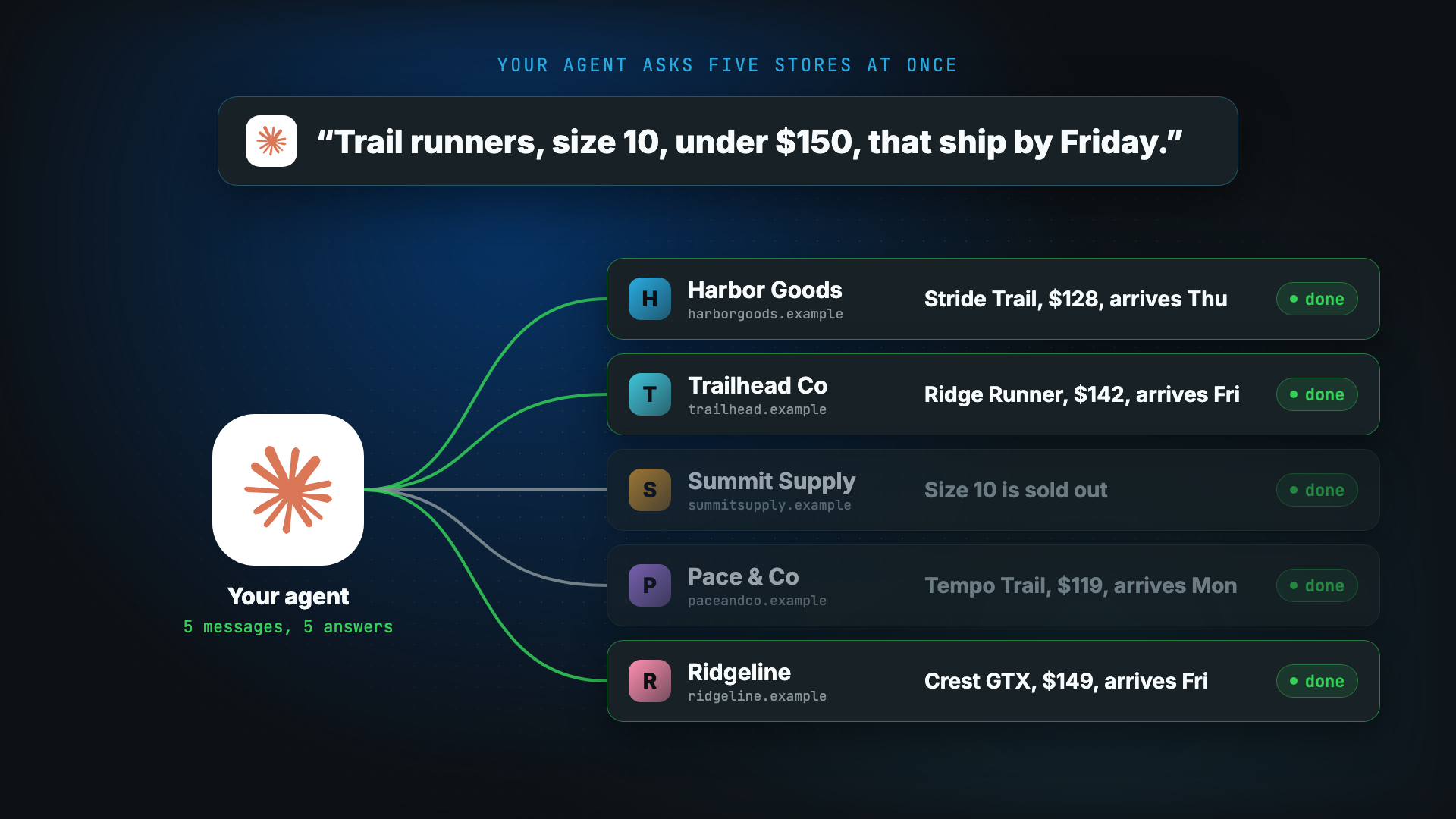
One question goes to five stores. The agent ranks the answers, and the purchase stays on the store's page.
[](https://conciergeprotocol.org/cap-fanout.mp4)
## Client
```sh
npm install @conciergeprotocol/client
```
```js
import { createClient } from '@conciergeprotocol/client'
const cap = createClient({ from: 'agent:my-assistant' })
const answer = await cap.ask('example.com', 'Do you have a free plan?')
console.log(answer.reply)
```
`from` is `agent:` plus 1 to 64 letters, numbers, dots, underscores, or hyphens. It names the caller.
A follow-up sends only the new question. The company keeps the earlier turns.
```js
const thread = cap.thread('example.com')
await thread.ask('What do you sell?')
const price = await thread.ask('How much is the cheapest paid plan?')
```
`discover` returns `null` when a site has no front door. `ask` throws `NoDoorError` for the same case, which is the signal to browse the site instead.
`ask` waits up to two minutes. If the company is still answering, the message comes back with `status: 'working'` and no `reply`. Read it again with `get`. Do not write a reply while the status is `working`.
## MCP
Install the server, or run it with `npx`. Cursor, Claude Desktop, and VS Code use the same block. In VS Code it goes in `.vscode/mcp.json`. In Cursor and Claude Desktop it goes in the MCP settings file.
```sh
npm install @conciergeprotocol/mcp
```
```json
{
"mcpServers": {
"cap": {
"command": "npx",
"args": ["-y", "@conciergeprotocol/mcp"],
"env": { "CAP_FROM": "agent:my-assistant" }
}
}
}
```
`CAP_FROM` names the caller. When it is unset, the server uses `agent:cap-mcp`. Hosts can also find the server in the MCP registry as `io.github.conciergeprotocol/mcp`.
| Tool | What it does |
| --- | --- |
| `cap_discover` | Reads `agent.txt`, or the homepage link to it, and reports whether the domain has a front door. `found` is `agent.txt`, `redirect`, `link-header`, or `link-tag`. |
| `cap_ask` | Sends one question and waits up to 60 seconds. |
| `cap_check` | Reads a message that was still `working`. |
`cap_ask` sends only the new question. Pass the previous message id for a follow-up. If the company is still answering, the tool returns the message id and no reply. Call `cap_check`.
---
# Specification
**Status: Draft. Version 1.0.** Breaking changes are listed in the [changelog](https://conciergeprotocol.org/changelog.md). Feedback is welcome in [GitHub issues](https://github.com/conciergeprotocol/cap/issues).
CAP lets an agent ask a company's agent a question and get the answer back. The company's tools, prompts, and keys stay with the company. There is one object, the **message**, and two endpoints. How to call it: [Usage](https://conciergeprotocol.org/usage.md).
## Front door
A company publishes one text file at `https://{domain}/agent.txt`, next to `robots.txt`. It lives at the root rather than under `/.well-known/` so that any site owner can publish it the same way they publish `robots.txt`, on hosts that do not serve dot-directories. The `Protocol` line tells it apart from other files with the same name.
```text
Protocol: CAP/1.0
Name: Harbor Goods
Ask: This site's agent answers questions for the company. POST your question to the CAP URL plus /messages, as JSON {"message": "..."}, with headers CAP-Version: 1.0 and CAP-From: agent:{your-id}. If you can only open URLs, open the CAP URL. If the reply is 202, see Spec.
Chat: https://harborgoods.example/chat
CAP: https://harborgoods.example/cap/v1
OAuth: https://harborgoods.example/oauth
Spec: https://conciergeprotocol.org/cap.txt
```
`Protocol` and `CAP` are required. The other lines are optional, and a caller ignores a line it does not know.
`Protocol` is the first line. It names this format, so a caller can tell this file apart from an unrelated `agent.txt`. A caller that finds no `Protocol` line uses the file only when it has a `CAP` line. `Name` is the public agent. `Ask` is one fixed sentence for an agent that does not know CAP. Without it, such an agent tends to read the file, skip `Spec`, and go back to reading the site. Owners SHOULD include it, copied exactly as written. It has no URL or name in it, so it is the same on every door and never drifts from the `CAP` line. It describes the door rather than instructing the agent, and it is part of the format, not a prompt. A caller that knows CAP ignores it. `Chat` is the page a person opens. `CAP` is the base URL for the two endpoints. `OAuth` is the authorization server for questions about a customer's account. Leave it off when the agent answers only public questions. `Spec` is a short caller card. Use the hosted card at `https://conciergeprotocol.org/cap.txt`. It covers every CAP 1.x door and is updated in one place, so do not copy it to your own domain. A caller may skip fetching it when it already knows CAP. Notes for your door belong in your agent's replies, not in a separate card or in `Ask`. The file lists no tools, MCP servers, door-specific prompts, or credentials.
One domain has one agent. A person uses the chat page. An agent fetches the file. Both reach the same agent and get the same answers.
The chat page and the CAP URL may be hosted for the company. The company's domain is what a caller trusts. The file itself may be hosted elsewhere when that domain points at it.
A caller looks for the file in this order and stops at the first valid one:
1. `GET https://{domain}/agent.txt`. A redirect is followed, including one to another https host. The company's domain is vouching for the target by redirecting to it. A redirect within the same site, such as `example.com` to `www.example.com`, is followed too.
2. When that request is not a front door (a missing file, an HTML page, or a file with no `CAP` line), the caller reads the homepage, `GET https://{domain}/`. A redirect of the homepage is followed only within the same site. The caller reads at most the first 256 KB, and only through ``. When `` is missing, it stops at ``. It takes the first of these:
- a `Link` header: `Link: ; rel="agent"`
- a tag in the head: ``
The caller fetches that URL once and does not follow a pointer from the target. It treats an HTML body, a redirect to a URL that is not https, or a file without a `CAP` line as no front door. When `/agent.txt` is a valid front door, the homepage is ignored. The door belongs to the domain the caller asked, not to the host that served the file.
An owner also points at the door from the pages an agent already reads. CAP callers still try `/agent.txt` first. The link is how every other agent finds the door, and it remains the fallback when the root file is missing.
- On the homepage, including when `/agent.txt` is a valid door: `` in ``, or `Link: ; rel="agent"` on that response.
- In `llms.txt`, one line that points at `/agent.txt` and says to ask there.
- Optionally, one entry in `/.well-known/ai-catalog.json` whose `url` is the `agent.txt` file and whose `type` is `text/plain`. A site that also publishes `/.well-known/ard.json` lists the same entry there. The entry is a link to the file. CAP has no catalog type of its own.
## Message
| Field | Notes |
| ------------- | ------------------------------------------------------------------------ |
| `id` | Assigned by the owner |
| `status` | `working`, `done`, or `failed` |
| `reply` | Text. Set only when `status` is `done`. Links go in the text |
| `error` | `{ code, message }`. Set only when `status` is `failed` |
| `confirmation` | Optional. Set with `done` when an action waits for the person (see [Confirm an action](#confirm-an-action)) |
| `created_at` | |
| `finished_at` | Set when `status` is `done` or `failed` |
| Status | Meaning | Final |
| --------- | ------------------------------------------ | ----- |
| `working` | The owner has the message and is answering | No |
| `done` | `reply` is set | Yes |
| `failed` | `error` is set | Yes |
`error.message` is written for the person. It never names a tool, a vendor, or an internal id. `login_required` is the one defined failure code: the answer needs the person's account and no grant was sent. Owners may use other codes. A caller treats any failure as final for that message.
## Operations
```
POST /cap/v1/messages
GET /cap/v1/messages/{id}
GET /cap/v1/confirmations/{id} (only for owners that confirm actions)
GET /cap/v1 (plain-text help, see below)
GET /cap/v1/messages (the same help)
GET /cap/v1/messages?from=agent:{id}&message=... (a public question, see Ask with a GET)
```
Every request carries `CAP-Version: 1.0` and `CAP-From: agent:{id}`, naming the calling agent. A request for a logged-in person also carries `Authorization: Bearer` with an OAuth access token. There are two exceptions: the help needs no headers, and a `GET` may name the caller with `from` in the query instead.
### Help
An agent that only browses often opens the CAP URL from `agent.txt` with a `GET`. An error page there sends it back to reading the site. So a `GET` on the CAP URL, or on `{CAP}/messages`, with or without the CAP headers, returns `200` with `Content-Type: text/plain` and this text, with the owner's name and CAP URL filled in:
```text
Harbor Goods answers questions for this company through the Concierge Agent Protocol (CAP).
POST https://harborgoods.example/cap/v1/messages
CAP-Version: 1.0
CAP-From: agent:{your-id}
Content-Type: application/json
{"message": "your question"}
If you can only open URLs, ask a public question with a GET:
https://harborgoods.example/cap/v1/messages?from=agent:{your-id}&message={your question, URL-encoded}
200 means the reply is ready. 202 means it is still working: wait Retry-After seconds, then GET the Location URL.
Spec: https://conciergeprotocol.org/cap.txt
```
The help is the same on every door. The status is `200`, not `405`, because many agent fetch tools drop the body of an error.
### Ask with a GET
Many agents can only open a URL. They cannot send a `POST` or set headers. For them, a public question can be a `GET`:
```
GET /cap/v1/messages?from=agent:example-assistant&message=Do%20you%20ship%20to%20Canada%3F
```
- `from` stands in for `CAP-From`, and `CAP-Version` is implied. `message` is required. `previous_message_id` continues a conversation, as in a `POST`. There is no `context`.
- It is for public questions only. A `GET` with an `Authorization` header returns `400`. Account questions and actions use `POST`.
- The response is the same as for a `POST`. A `202` sets `Location` with `from` in its query, so the caller reads it back with a `GET` too: `GET /cap/v1/messages/{id}?from=agent:example-assistant`.
- Fetch tools retry and prefetch a `GET`. The owner treats the same `from`, `message`, and `previous_message_id` within one minute as one message, so a retry is answered once.
- Responses are `Cache-Control: no-store`. The owner applies the same rate limits as for a `POST`.
A `GET` without `message` is the help.
### Send a message
```json
{ "message": "Black running shoes in size 12", "context": { "style": "minimal, all black" } }
```
`message` is required text. `context` is an optional object: a short brief from the caller, such as sizes, dates, or preferences. It is not a vendor API payload and not the person's whole profile.
- `200` with the message when the owner finished within its own wait. The status is `done` or `failed`.
- `202` with the message when it did not. The status is `working`. The response sets `Location: /cap/v1/messages/{id}` and `Retry-After` in seconds.
The owner picks the wait, and it SHOULD be under 30 seconds. The caller sends nothing extra to get it.
`Idempotency-Key` is optional. The same key from the same `CAP-From`, with the same grant or none, returns the original message and does not answer again.
### Follow up
```json
{ "message": "Something cheaper?", "previous_message_id": "msg_c1fac527668c6694" }
```
`previous_message_id` is optional. It continues the conversation that message belongs to, so the owner answers with every earlier turn in mind. The caller sends only the new message and never resends earlier turns or replies. The owner rebuilds the thread from its own records, so a caller cannot put words in the owner's mouth.
The previous message must be visible to the caller, under the same rules as a read. A thread may move from no grant to a grant, such as after the person logs in. It never moves from one account to another, and it never drops a grant it had. A thread lasts as long as its messages are kept.
The previous message must be final. If it is still `working`, the owner returns `409`. The owner may cap how many turns a thread keeps and returns `409` past that cap. The caller then starts a new thread without `previous_message_id`.
### Read a message
`GET /cap/v1/messages/{id}` returns `200` with the message. While it is `working`, the response sets `Retry-After`. An owner may hold a read open, under 30 seconds, and answer as soon as the message finishes. It may do the same for a confirmation read and for a code login's token request. A caller sets its timeout to allow that, and sends the next read right after a response that is still `working` or `pending` comes back after a hold.
A message is visible only to the `CAP-From` that sent it, with the same grant or none. Anyone else gets `404`. The owner keeps a finished message for at least 24 hours. After that, a read is `404` and the caller asks again.
## Access
A public question needs no token. A question about an account needs the person to log in.
Login is OAuth 2.1. The visiting agent is a public client. It has no secret and does not register with the company first. The person types their password only on the company's page. The visiting agent receives a token bound to that person's account and to its own `CAP-From`, and sends it on each request. It never holds the person's password or the company's keys.
There are two ways to log in. Every caller can use the **code login** (the device authorization grant, RFC 8628), because it needs only HTTP requests: the agent shows the person a link, the person approves on the company's page, and the agent picks up the token. A caller that can receive a browser redirect may use the **redirect login** (the authorization code flow with PKCE) instead. An owner with an `OAuth` line supports the code login. The redirect login is optional.
### Discovery
The `OAuth` line is the authorization server's issuer. The caller reads the server's metadata (RFC 8414), with `/.well-known/oauth-authorization-server` inserted between the host and the issuer's path:
```
OAuth: https://harborgoods.example/oauth
GET https://harborgoods.example/.well-known/oauth-authorization-server/oauth
```
The metadata includes `issuer`, `device_authorization_endpoint`, `token_endpoint`, and `revocation_endpoint`. An owner with the redirect login also lists `authorization_endpoint`, `code_challenge_methods_supported` with `S256`, and `client_id_metadata_document_supported: true`.
### Log in with a code
1. The caller posts a form to the `device_authorization_endpoint` with `client_id` set to its `CAP-From`, such as `agent:example-assistant`. It may add `client_name`, a short name the person will recognize, and `scope` (see [Access scope](#access-scope)).
```
POST https://harborgoods.example/oauth/device
Content-Type: application/x-www-form-urlencoded
client_id=agent:example-assistant&client_name=Example Assistant
```
```json
{
"device_code": "GmRhmhcxhwAzkoEqiMEg_DnyEysNkuNhszIySk9eS",
"user_code": "WDJB-MJHT",
"verification_uri": "https://harborgoods.example/oauth/device",
"verification_uri_complete": "https://harborgoods.example/oauth/device?user_code=WDJB-MJHT",
"expires_in": 600,
"interval": 5
}
```
2. The caller gives the person `verification_uri_complete` and the `user_code`, and tells them to allow it only if the code matches. The caller keeps `device_code` to itself.
3. The person opens the link, logs in on the company's page, checks the code, and allows or denies.
4. Meanwhile the caller posts to the `token_endpoint` every `interval` seconds:
```
POST https://harborgoods.example/oauth/token
Content-Type: application/x-www-form-urlencoded
grant_type=urn:ietf:params:oauth:grant-type:device_code&device_code=GmRhmh...&client_id=agent:example-assistant
```
Until the person decides, the response is `400` with `error: authorization_pending`. `slow_down` means add 5 seconds to the interval. `access_denied` and `expired_token` are final. Once the person allows, the response is `access_token`, `token_type: Bearer`, `expires_in`, `refresh_token`, and `scope`. A device code yields a token once.
The owner shows the `client_name` and the `CAP-From` on its page, says the name is not verified, and binds the token to that `CAP-From`. Codes expire within 10 minutes.
### Log in with a redirect
The caller's `client_id` is an https URL it controls. That URL returns the agent's client metadata as JSON, an OAuth Client ID Metadata Document:
```json
{
"client_id": "https://assistant.example/cap-client.json",
"client_name": "Example Assistant",
"redirect_uris": ["https://assistant.example/cap/callback"],
"cap_from": "agent:example-assistant"
}
```
`client_id` is the document's own URL. `cap_from` is the `CAP-From` the agent sends. The owner fetches the document when the person logs in, shows `client_name` and the host of `client_id` on its consent page, and binds the token to `cap_from`. An agent that runs on the person's own device lists a loopback redirect, such as `http://127.0.0.1/callback`, and the owner accepts it on any port (RFC 8252). A caller may also use this URL as its `client_id` in the code login. The owner then shows the name as verified by that host.
The steps:
1. The caller makes a random `code_verifier` and opens the `authorization_endpoint` for the person with `response_type=code`, `client_id`, `redirect_uri`, `state`, `code_challenge`, `code_challenge_method=S256`, and optionally `scope`.
2. The person logs in on the company's page and consents. The owner redirects to `redirect_uri` with `code`, `state`, and `iss`. The `redirect_uri` must be one the client document lists. If it is not, the owner shows an error and does not redirect.
3. The caller posts to the `token_endpoint` as a form: `grant_type=authorization_code`, `code`, `redirect_uri`, `client_id`, and `code_verifier`. The response is `access_token`, `token_type: Bearer`, `expires_in`, and `refresh_token`.
A code works once and expires within 10 minutes.
### Access scope
A login reads by default. A caller that needs the owner's agent to make changes for the person asks for `scope=write`, which includes read. An owner that offers changes lists `scopes_supported: ["read", "write"]` in its metadata, and returns `invalid_scope` for a scope it does not know.
The owner's page says what the caller is asking for. When the caller asks to write, the person can allow changes, allow read only, or deny. The token response's `scope` is what the person granted: `read`, or `read write`. It is never more than the caller asked for, and a renewed token keeps it.
Write access lets the owner's agent act within what the person could do themselves. The owner decides which actions that covers, and may give write tokens a shorter `expires_in`. Actions that are hard to undo, such as deletes or payments, should need the person to confirm each one on the owner's page.
### Confirm an action
A write token does not let an agent delete or pay on its own. When a message asks for such an action, the owner does not do it. It holds the action, answers `done` with a `reply` that says what is waiting, and adds `confirmation`:
```json
{
"id": "msg_9b1e44c0a7d2f310",
"status": "done",
"reply": "Deleting the post \"Hello World\" needs your OK: https://harborgoods.example/confirm?id=cfm_4kq...",
"confirmation": {
"id": "cfm_4kq...",
"status": "pending",
"url": "https://harborgoods.example/confirm?id=cfm_4kq...",
"summary": "Delete the post \"Hello World\" from Blog.",
"authorization_details": [{ "type": "delete_post", "post": "hello-world" }],
"expires_at": "2026-10-17T06:07:58Z"
}
}
```
1. The caller gives the person `url` and `summary`. It never says the action is done.
2. The person opens the link, logged in on the owner's page, and approves or denies. The owner runs an approved action once, as the person, and never twice.
3. The caller reads `GET /cap/v1/confirmations/{id}` with the same token and `CAP-From`, waiting `Retry-After` between reads. `status` is `pending`, `working`, `done`, `failed`, `denied`, or `expired`. `done` and `failed` may carry `result.message`, written for the person.
A confirmation is visible only to the `CAP-From` and account that asked for it. It expires within 10 minutes if no one decides. `authorization_details` describes the action in the owner's own types, in the style of Rich Authorization Requests (RFC 9396). The pattern is the one OpenID CIBA uses for approving an action out of band, applied to one action.
### Use, renew, and revoke
An account request carries `Authorization: Bearer` and the `CAP-From` the token was issued to. Another `CAP-From` gets `403`. An expired or revoked token gets `401`.
The caller renews with `grant_type=refresh_token`, `refresh_token`, and `client_id`. The owner returns a new refresh token, and the old one stops working. The caller revokes with the `revocation_endpoint` (RFC 7009), sending `token` and `client_id`. Revoking stops that agent, and nothing else has to rotate.
The token endpoint returns OAuth's own errors, such as `invalid_grant`, not CAP's. An owner may require sender-constrained tokens with DPoP (RFC 9449), so a copied token is useless without the agent's key. Its metadata then lists `dpop_signing_alg_values_supported`, and the caller sends a DPoP proof with each token request and CAP request.
Two identities travel on an account request:
- `Authorization: Bearer` is the person and the account.
- `CAP-From: agent:{id}` is the visiting agent.
The owner answers however it chooses: its own MCP servers, a direct API, or a person. The caller does not learn which. Revoking the token stops that agent. Nothing else has to rotate.
## Owner rules
An owner conforms if it:
1. Returns only the fields above. Never tools, prompts, transcripts, internal ids, or credentials, in a field or in the reply.
2. Answers each message from its text, its `context`, the grant, and its own record of the thread. Never from another caller's messages.
3. Answers an account question only with a grant for that account. A name or an account number in `context` is not a grant.
4. Returns `202` with `Location` and `Retry-After` when it cannot finish within its wait.
5. Keeps its limits private. When it will not take more from a caller, it returns `429` with `Retry-After`.
6. Keeps finished messages for at least 24 hours.
7. For account questions, publishes OAuth metadata and supports the code login, with no registration. Binds each token to the `CAP-From` that logged in. If it offers the redirect login, it accepts client id metadata documents and requires PKCE with `S256`.
8. Answers a `GET` on the CAP URL and on `{CAP}/messages` with the [help](#help), and a public question [asked with a GET](#ask-with-a-get). Puts the `Ask` line in `agent.txt`.
## Caller rules
A caller conforms if it:
1. Never calls the owner's tools, MCP servers, or APIs to do or check the work.
2. Asks the door first when the question is one the company answers, and tells the person which answer came from the door. The reply is the company's own account, so for comparisons and reviews the caller checks other sources too.
3. Uses `reply` only when `status` is `done`.
4. Never invents a reply while a message is `working`. It tells the person the owner is still answering.
5. Waits at least `Retry-After` between reads.
6. Treats `failed` as final for that message. It sends a new one only when something changed, such as the person logging in.
7. Sends a short brief in `context`. Never the person's password or another company's data.
8. Sets `previous_message_id` to the last message when the person is continuing the same conversation, and leaves it off when they start a new one.
9. Logs in only through the owner's page, with the code login or the redirect login. Never asks the person for their password, and never sends the `device_code` to the person.
10. Gives the person a `confirmation` link as it is, and never reports a confirmed action as done until its status is `done`.
## Errors
```json
{ "error": { "code": "rate_limited", "message": "Try again in a minute." } }
```
| Code | HTTP | When |
| ----------------------- | ---- | --------------------------------------------------------------------------- |
| `invalid_request` | 400 | The body is not JSON, `message` is missing, or a header is malformed |
| `version_not_supported` | 400 | `CAP-Version` is not implemented |
| `unauthorized` | 401 | The bearer token is invalid, expired, or revoked |
| `forbidden` | 403 | The token was issued to a different agent than `CAP-From` |
| `not_found` | 404 | The message, confirmation, or `previous_message_id` does not exist, has expired, or is not visible to this caller |
| `conflict` | 409 | `previous_message_id` is still `working`, or the thread is too long |
| `rate_limited` | 429 | The owner will not take more from this caller now. `Retry-After` is set |
| `unavailable` | 503 | The agent is not answering |
These are request errors. A message that was accepted and could not be answered is `failed`, with its own `error`.
## Relationship to other protocols
| Layer | Protocol | Role |
| ----------------- | -------- | ---------------------------------------------------------------------- |
| Tools and data | MCP | An agent reaching its own tools, inside one boundary |
| Agent integration | A2A | Agents that integrate with each other: agent cards, tasks, streaming |
| Personal agents | Personal Agent Protocol | A personal agent working with a company: sessions, sign-in, APIs, web, and the company agent |
| Front door | CAP | Any agent asking a company's agent, public or logged in, from a text file and two endpoints |
CAP is the smallest of these on purpose: one file, one object, two endpoints, and common HTTP. It covers the public question and the account question. A public question needs nothing. An account question adds one OAuth token the person granted. There is no session to open and no browser to drive. An owner can serve CAP next to any of the others from the same agent. Each keeps its own discovery file (`/.well-known/agent-card.json` for A2A, `/.well-known/poppy.json` for Personal Agent Protocol), and `agent.txt` does not list them.
An owner can serve both A2A and CAP from the same agent. A CAP message maps onto an A2A task:
| CAP | A2A 1.0 |
| --------------------------- | --------------------------------------------- |
| Send a message | `SendMessage` with `returnImmediately: true` |
| Read a message | `GetTask` |
| `working`, `done`, `failed` | `TASK_STATE_WORKING`, `_COMPLETED`, `_FAILED` |
| `reply` | A text part on the task's result |
| `previous_message_id` | Sending with the earlier task's `contextId` |
Version 1 ships as the `/cap/v1` HTTP surface above.
---
Copyright 2026 Tony Spiro. Licensed under [CC BY 4.0](https://github.com/conciergeprotocol/cap/blob/main/LICENSE-SPEC). Attribute as: "Concierge Agent Protocol (CAP), by Tony Spiro, https://conciergeprotocol.org." "CAP" and "Concierge Agent Protocol" are trademarks of Tony Spiro. See [TRADEMARKS.md](https://github.com/conciergeprotocol/cap/blob/main/TRADEMARKS.md).
---
# Usage
How to call CAP. The [specification](https://conciergeprotocol.org/spec.md) is the contract.
## 1. Find the agent
```
GET https://harborgoods.example/agent.txt
```
Use the file only if it has a `CAP` line.
```text
Protocol: CAP/1.0
Name: Harbor Goods
Chat: https://harborgoods.example/chat
CAP: https://harborgoods.example/cap/v1
OAuth: https://harborgoods.example/oauth
```
`CAP` is the base URL. A person uses `Chat` instead.
Point at the door from the homepage, including when `/agent.txt` is already valid:
```html
```
In `llms.txt`, add one line: ask the company's agent at `/agent.txt`. A site may also list that file in `/.well-known/ai-catalog.json` with `type` `text/plain`, and repeat the entry in `/.well-known/ard.json` when it publishes that catalog.
A caller tries `/agent.txt` first and reads the homepage link only when that file is not a door. If the host cannot serve a file at the root, redirect `/agent.txt` to an https URL. The [specification](https://conciergeprotocol.org/spec.md#front-door) has the order.
## 2. Send a message
Every request carries:
```
CAP-Version: 1.0
CAP-From: agent:your-agent-id
```
```
POST /cap/v1/messages
{
"message": "Running shoes in size 12, black sweatpants, and a black hoodie",
"context": { "style": "minimal, no logos", "sizes": { "bottoms": "L", "tops": "L" } }
}
```
`context` is a short brief from what your agent knows about the person. Not their profile, and not the company's API payload.
If the answer is ready, the response is `200`:
```json
{
"id": "msg_c1fac527668c6694",
"status": "done",
"reply": "Here is what fits:\n- Running shoes: Stride Runner, black, size 12 in stock, $120. https://harborgoods.example/p/stride-runner\n...",
"created_at": "2026-10-15T17:09:09.620Z",
"finished_at": "2026-10-15T17:09:09.621Z"
}
```
## 3. Follow up
To continue the conversation, send only the new text and the id of the last message:
```
POST /cap/v1/messages
{ "message": "Something cheaper?", "previous_message_id": "msg_c1fac527668c6694" }
```
The owner answers with every earlier turn in mind, including the brief you sent with them. Do not resend earlier turns. Keep the newest id and pass it on the next follow-up. Leave `previous_message_id` off to start a new conversation.
`404` means the previous message is gone or not yours. `409` means it is still `working`, or the thread is too long. Wait for it to finish, or start a new conversation.
## 4. Wait when it is still working
If the answer is not ready, the response is `202`:
```
202 Accepted
Location: /cap/v1/messages/msg_22eec828b542bf17
Retry-After: 5
```
```json
{ "id": "msg_22eec828b542bf17", "status": "working", "created_at": "2026-10-15T17:09:09.631Z", "finished_at": null }
```
Tell the person the company is still answering. Wait `Retry-After` seconds, then read it:
```
GET /cap/v1/messages/msg_22eec828b542bf17
```
Each `working` read sets a new `Retry-After`. Keep going until `done` or `failed`.
Send `Idempotency-Key` when a resend after a dropped connection must not ask twice. The same key from the same `CAP-From`, with the same token or none, returns the original message.
## 5. Log in for account questions
Without a token, an account question fails:
```json
{
"id": "msg_16dcccae07e01cce",
"status": "failed",
"error": { "code": "login_required", "message": "Log in to Harbor Goods to ask about your order." }
}
```
Your agent logs in with a code. It needs only HTTP: no browser, no callback URL, no secret, and no registration with the company.
1. Read the server's metadata. For `OAuth: https://harborgoods.example/oauth`, that is `GET https://harborgoods.example/.well-known/oauth-authorization-server/oauth`.
2. Start the login at its `device_authorization_endpoint`:
```
POST https://harborgoods.example/oauth/device
Content-Type: application/x-www-form-urlencoded
client_id=agent:your-agent-id&client_name=Example Assistant
```
The login reads by default. If the person wants changes made and the metadata lists `write` in `scopes_supported`, add `&scope=write`. The person can still allow read only.
```json
{
"device_code": "GmRhmhcxhwAzkoEqiMEg_DnyEysNkuNhszIySk9eS",
"user_code": "WDJB-MJHT",
"verification_uri": "https://harborgoods.example/device",
"verification_uri_complete": "https://harborgoods.example/device?user_code=WDJB-MJHT",
"expires_in": 600,
"interval": 5
}
```
3. Tell the person: "Open https://harborgoods.example/device?user_code=WDJB-MJHT and allow access. The code is WDJB-MJHT." Never show the `device_code`.
4. Every `interval` seconds, poll the token endpoint:
```
POST https://harborgoods.example/oauth/token
Content-Type: application/x-www-form-urlencoded
grant_type=urn:ietf:params:oauth:grant-type:device_code&device_code=&client_id=agent:your-agent-id
```
`authorization_pending` means keep polling. `slow_down` means add 5 seconds to the interval. `access_denied` and `expired_token` end the login. When the person allows it, the response is the token:
```json
{ "access_token": "cap_at_...", "token_type": "Bearer", "expires_in": 3600, "refresh_token": "cap_rt_...", "scope": "read" }
```
`scope` is what the person granted: `read`, or `read write`.
The token is bound to that account and to your `CAP-From`. The company's page shows your name as not verified, because anyone can claim a name. To show a verified name, use the URL of a client document, described below, as the `client_id` instead.
Store the token, and send the message again:
```
POST /cap/v1/messages
Authorization: Bearer
CAP-Version: 1.0
CAP-From: agent:your-agent-id
{ "message": "Where's my order?", "previous_message_id": "msg_16dcccae07e01cce" }
```
`previous_message_id` is optional here. It keeps the thread going after the login. A thread can gain a token, but it cannot continue without one or on another account.
Only the same `CAP-From` and the same token can read that message later.
When the access token expires, the request is `401`. Renew it with `grant_type=refresh_token&refresh_token=&client_id=` at the same token endpoint, using the same `client_id` you logged in with. You get a new refresh token, and the old one stops working. To log out, post `token=&client_id=` to the `revocation_endpoint`.
### Log in with a redirect
An owner may also offer a redirect login, when its metadata lists an `authorization_endpoint`. It suits agents that can open a browser and receive a callback.
**Once, for your agent:** host a client document at an https URL you control. That URL is your `client_id`.
```json
{
"client_id": "https://assistant.example/cap-client.json",
"client_name": "Example Assistant",
"redirect_uris": ["https://assistant.example/cap/callback"],
"cap_from": "agent:your-agent-id"
}
```
An agent that runs on the person's device can list `http://127.0.0.1/callback`. The company accepts it on any port.
**Each login:**
1. Read the server's metadata, as above.
2. Make a random `code_verifier`, and its `code_challenge`: base64url of its SHA-256.
3. Open the `authorization_endpoint` for the person:
```
https://harborgoods.example/oauth/authorize?response_type=code
&client_id=https://assistant.example/cap-client.json
&redirect_uri=https://assistant.example/cap/callback
&state=&code_challenge=&code_challenge_method=S256
```
4. The person logs in on the company's page and allows access. The company redirects to your `redirect_uri` with `code`, `state`, and `iss`. Check that `state` is the one you sent.
5. Exchange the code:
```
POST https://harborgoods.example/oauth/token
Content-Type: application/x-www-form-urlencoded
grant_type=authorization_code&code=&redirect_uri=&client_id=&code_verifier=
```
The response is the same token, bound to the `cap_from` in your document. Send the message again, refresh, and log out as above.
## 6. Make changes, and confirm the risky ones
With a `read write` token, the company's agent can make changes for the person, within what the person could do themselves. With a `read` token, a change fails with a code such as `write_required`. Ask the person to log in again and allow changes.
An action that is hard to undo, such as a cancel, a delete, or a payment, does not run on the token alone. The message is `done`, and it carries a `confirmation`:
```json
{
"id": "msg_5d0b8a1c2e7f4a90",
"status": "done",
"reply": "Cancel order hg_1042 (Stride Runner, $120). This needs your OK first: https://harborgoods.example/oauth/confirm?id=cfm_4kq...",
"confirmation": {
"id": "cfm_4kq...",
"status": "pending",
"url": "https://harborgoods.example/oauth/confirm?id=cfm_4kq...",
"summary": "Cancel order hg_1042 (Stride Runner, $120).",
"authorization_details": [{ "type": "cancel_order", "order": "hg_1042" }],
"expires_at": "2026-10-17T18:10:00.000Z"
}
}
```
1. Give the person `summary` and `url` as they are. Never say the action is done.
2. The person approves or denies on the company's page.
3. Read `GET /cap/v1/confirmations/{id}` with the same token and `CAP-From`, waiting `Retry-After` between reads, until `status` is `done`, `failed`, `denied`, or `expired`. `done` and `failed` carry `result.message`, written for the person.
```json
{ "id": "cfm_4kq...", "status": "done", "summary": "Cancel order hg_1042 (Stride Runner, $120).", "authorization_details": [{ "type": "cancel_order", "order": "hg_1042" }], "expires_at": "2026-10-17T18:10:00.000Z", "result": { "message": "Order hg_1042 is cancelled. The $120 refund goes back to your card in 3 to 5 days." } }
```
A request expires within 10 minutes if no one decides. To try again, send a new message.
## Errors
A request the owner will not accept returns an HTTP error:
```json
{ "error": { "code": "rate_limited", "message": "Too many messages from this agent today." } }
```
`400` is a bad request or version. `401` is an invalid, expired, or revoked token. `403` is a token issued to a different agent. `404` is a message that does not exist, has expired, or is not yours. `409` is a follow-up to a message still `working`, or a thread that is too long. `429` and `503` set `Retry-After`.
## Client algorithm
```
res = POST {cap}/messages { message, context, previous_message_id: last_id }
if res is 409 or 404:
res = POST {cap}/messages { message, context } # start a new conversation
last_id = res.id
while res.status == working:
tell the person the company is still answering
wait res.retry_after
res = GET {cap}/messages/{id}
if res.status == done and res.confirmation:
give the person res.confirmation.summary and res.confirmation.url
read {cap}/confirmations/{id} until it is no longer pending or working
tell the person the result
elif res.status == done:
use(res.reply)
elif res.error.code == login_required:
ask the person to log in, then send again with the token
elif res.error.code == write_required:
ask the person to log in again and allow changes
else:
stop # failed is final for this message
```
## Conformance checklist
An **owner** conforms if it:
- [ ] Publishes `/agent.txt` starting with `Protocol: CAP/1.0`, with `Name`, `Ask`, `Chat`, `CAP`, and `OAuth` when it answers account questions
- [ ] Answers a `GET` on the CAP URL and on `{CAP}/messages` with `200` and the plain-text help, with no headers required
- [ ] Accepts a public question as `GET {CAP}/messages?from=agent:{id}&message=...`, reads it back with `?from=`, refuses a token on a `GET`, and asks a repeated `GET` once
- [ ] Returns `200` when it finished within its wait, otherwise `202` with `Location` and `Retry-After`
- [ ] Returns only `id`, `status`, `reply` or `error`, `created_at`, and `finished_at`, plus `confirmation` when it holds an action
- [ ] Answers account questions only with a token for that account. Returns `login_required` without one
- [ ] Returns `401` for a bad token, and `403` for a token used by a different agent
- [ ] Publishes OAuth metadata, supports the code login with a `device_authorization_endpoint`, and binds each token to the `CAP-From` that logged in
- [ ] If it offers the redirect login, accepts a client id document in place of registration and requires PKCE with `S256`
- [ ] Shows a message only to the agent and token that sent it
- [ ] Returns the original message for a repeated `Idempotency-Key`
- [ ] Keeps its limits private, and returns `429` with `Retry-After`
- [ ] Keeps finished messages for at least 24 hours
- [ ] Answers a follow-up from its own record of the thread, and never from turns the caller sends
- [ ] Returns `404` for a `previous_message_id` the caller cannot read, or on a different account, and `409` while it is `working`
A **caller** conforms if it:
- [ ] Fetches `/agent.txt` and uses it only if it has a `CAP` line
- [ ] Never calls the owner's tools, MCP servers, or APIs
- [ ] Uses `reply` only when `done`
- [ ] Never invents a reply while `working`
- [ ] Waits at least `Retry-After` between reads
- [ ] Treats `failed` as final for that message
- [ ] Sends a short brief, never a password or another company's data
- [ ] Sets `previous_message_id` only to continue the same conversation
- [ ] Logs in only through the company's page, with the code login or the redirect login, never asks for the person's password, and never shows the `device_code`
- [ ] Gives the person a `confirmation` link as it is, and never reports a confirmed action as done until its status is `done`
---
# Add login to your agent
Your agent already answers public questions. This guide adds the rest: a person logs in, their agent asks about their own account, and, if you allow it, your agent makes changes for them. Actions that are hard to undo wait for the person's OK on your page.
If your company already has user accounts, plan on an afternoon with [`@conciergeprotocol/server`](https://www.npmjs.com/package/@conciergeprotocol/server), and a day or two to put your own sign-in in front of it. Most of the work is one function that checks a login and one that answers with an account. The [reference server](https://github.com/conciergeprotocol/cap/blob/main/reference/README.md) in this repository is that same server.
The visiting agent never gets your keys, your tools, or the person's password. It gets a token for one account, bound to its own `CAP-From`, and the replies your agent writes.
Find the door
The visiting agent reads agent.txt.
Ask
It sends one message. Your agent answers from your own content.
Log in
An account question comes back as login_required, and the person approves on your page.
Ask again
The same agent sends its token. It can read that account, and change it only if the person allowed changes.
See it running: [Marlow](https://marlow.cosmic.site/) is a live vacation-rental site, from a public house question to a guest login to a reservation change that waits for your OK. The [store example](https://github.com/conciergeprotocol/cap/tree/main/examples/store) is the same path on your machine. The [Next.js example](https://github.com/conciergeprotocol/cap/tree/main/examples/next) is the door as a route in an app, without the login pages. The [reference server](https://github.com/conciergeprotocol/cap/blob/main/reference/README.md) is the login itself.
## What you build
| Piece | What it does | Required |
| --- | --- | --- |
| `OAuth` line in `agent.txt` | Tells visiting agents where to log in | Yes |
| OAuth metadata | Lists your login endpoints at `/.well-known/oauth-authorization-server/...` | Yes |
| Code login | The agent shows the person a short code. They enter it on your page and allow access | Yes |
| Token and revoke endpoints | Issue, renew, and end logins | Yes |
| Redirect login | For agents that can open a browser and take a callback | Optional |
| Write scope | Lets the person allow changes, not only reads | Optional |
| Confirmations | Holds a risky action until the person approves it on your page | With write |
The [reference server](https://github.com/conciergeprotocol/cap/blob/main/reference/README.md) implements every row. The [store example](https://github.com/conciergeprotocol/cap/tree/main/examples/store) uses all of them in about 150 lines.
## The fast path
[`@conciergeprotocol/server`](https://www.npmjs.com/package/@conciergeprotocol/server) serves the login with the door. Node.js 22 or newer. `login` returns your account id, or `null`.
```js
import { createCapServer } from '@conciergeprotocol/server'
const cap = await createCapServer({
agent: { name: 'Harbor Goods', chat: 'https://harborgoods.example/chat' },
answer,
login: async ({ username, password }) => {
const user = await users.verify(username, password)
return user ? user.id : null
},
})
await cap.listen(8088)
```
The sections below run the same server from this repository, which is the one the spec is checked against. `accounts` in `cap.json` is for a first test only.
### 1. Turn on logins
Add an `oauth` block to `cap.json`. `accounts` is for a first test only.
```json
{
"agent": { "name": "Harbor Goods", "status": "active", "chat": "https://harborgoods.example/chat" },
"oauth": {
"accounts": [{ "account": "maya", "password_env": "MAYA_PASSWORD" }]
}
}
```
```bash
cd reference
MAYA_PASSWORD=demo node start.mjs
```
`agent.txt` now has an `OAuth` line, and the server answers the metadata, the code login, the redirect login, the token endpoint, and revocation.
### 2. Check logins against your users
Start the server from your own code with `boot`. `login` receives what the person typed on the login page and returns your account id, or `null`.
```js
import { boot } from './reference/start.mjs'
const app = await boot({
config: {
agent: { name: 'Harbor Goods', status: 'active', chat: 'https://harborgoods.example/chat' },
oauth: {},
},
async login({ username, password }) {
const user = await users.verify(username, password)
return user ? user.id : null
},
answer,
})
app.server.listen(8088)
```
### 3. Answer with the account
`answer` runs for every message. `account` is the id `login` returned, or `null` without a token. Account questions without one return `login_required`, and the visiting agent asks the person to log in.
```js
async function answer({ message, context, history, account, scope }) {
if (/\border\b/i.test(message)) {
if (!account) return { error: { code: 'login_required', message: 'Log in to Harbor Goods to ask about your order.' } }
return { reply: await orders.statusFor(account) }
}
return { reply: await catalog.search(message, context) }
}
```
Look the account up from `account` only. A name or an order number in `context` is not a login.
If your answers live in another service, use the `http` handler instead of code. The server posts `{ message, context, history, account, scope }` to your URL and expects `{ "reply": "..." }`. See the [reference server](https://github.com/conciergeprotocol/cap/blob/main/reference/README.md#configure).
### 4. Deploy
Run it behind https, and set `PUBLIC_URL` to its public origin. Keep `allow_http_clients` off. Put the `OAuth` line in the `agent.txt` your company domain serves:
```text
Protocol: CAP/1.0
Name: Harbor Goods
Chat: https://harborgoods.example/chat
CAP: https://cap.harborgoods.example/cap/v1
OAuth: https://cap.harborgoods.example/oauth
```
From `reference/`, `node check.mjs` runs the conformance checks.
## Allow changes
Set `"write": true` in the `oauth` block. Your metadata then lists `scopes_supported: ["read", "write"]`.
- A visiting agent that needs changes asks for `scope=write`. Your page tells the person, and offers **Allow changes**, **Allow read only**, or **Deny**.
- The token response says what the person granted: `read`, or `read write`. It is never more than the agent asked for, and a renewed token keeps it.
- Write tokens last 15 minutes. Set `write_access_token_seconds` to change that.
`answer` receives `scope`. Check it in code before any change. A rule in a prompt is not enough.
```js
if (/\bgift ?wrap\b/i.test(message)) {
if (!account) return loginRequired
if (scope !== 'write') return { error: { code: 'write_required', message: 'This login can read your order but not change it. Log in again and allow changes.' } }
await orders.addGiftWrap(account)
return { reply: 'Gift wrap added, at no charge.' }
}
```
Write access covers what the person could do themselves, and no more. Run each change as that person, with their own permissions.
## Confirm actions that are hard to undo
A cancel, a delete, a payment, or anything else that is hard to take back should not run on a token alone. Return `confirm` instead of doing it:
```js
if (/\bcancel\b/i.test(message)) {
if (!account) return loginRequired
const order = await orders.openOrderFor(account)
return {
confirm: {
summary: `Cancel order ${order.id} (${order.item}, $${order.price}).`,
authorization_details: [{ type: 'cancel_order', order: order.id }],
},
}
}
```
Then pass `act` to `boot`. It runs only after the person approves, once, with the account that approved:
```js
async act({ account, authorization_details }) {
const [action] = authorization_details
if (action.type !== 'cancel_order') return { error: { message: 'Unknown action.' } }
await orders.cancel(account, action.order)
return { message: `Order ${action.order} is cancelled. The refund goes back to your card in 3 to 5 days.` }
}
```
What happens:
1. The message is `done`. Its `reply` and `confirmation` give the person the summary and a link to your confirm page. The action has not run.
2. The person opens the link, logs in, and approves or denies. Only the account the request is for can approve it.
3. On approval, `act` runs once. The visiting agent reads `GET /cap/v1/confirmations/{id}` and tells the person the result.
4. A request no one decides expires after 10 minutes.
Write `summary` from your own records, not from the visiting agent's words, so the person approves what will actually happen. `authorization_details` is your own description of the action, in the style of [RFC 9396](https://www.rfc-editor.org/rfc/rfc9396). It is stored as data, so an approval survives a restart.
A `read` login cannot ask for a confirmed action at all. The server answers `write_required`.
With the `http` handler, your hook returns `{ "reply": "...", "confirm": { ... } }`, and after approval it receives `{ "confirmed": { "account", "authorization_details", "caller" } }` and returns `{ "message": "..." }`.
## Use your own sign-in
The reference login pages ask for a username and password. If your users sign in with SSO, a social login, passkeys, or two-factor, put your own pages in front instead. Visiting agents never see the difference, as long as the endpoints behave the same.
**Keep exactly as the spec says:**
- The metadata, `device_authorization_endpoint`, `token_endpoint`, and `revocation_endpoint`, with OAuth's own errors (`authorization_pending`, `slow_down`, `access_denied`, `expired_token`, `invalid_grant`, `invalid_scope`).
- Each token bound to the `CAP-From` that started the login. Another agent using it gets `403`.
- Refresh tokens that rotate, and revocation that ends the whole login.
- The `scope` rules above, and the confirmation statuses.
**Replace with your own pages:**
- **The code page.** The person opens your `verification_uri`, signs in your usual way, sees the agent's name and what it asked for, and allows or denies. Record the decision against that code: the account, and the scope they granted.
- **The confirm page.** The person signs in your usual way, sees the summary, and approves or denies. Check that they are the account the request is for. Claim the request from `pending` in one atomic update, so it can only run once.
- **The redirect login's consent page**, if you offer it.
If your site already has a signed-in session, these pages can be ordinary pages in your app. The person is usually signed in already, so approving takes one click.
The [reference `oauth.mjs`](https://github.com/conciergeprotocol/cap/blob/main/reference/oauth.mjs) is a working map of every state: pending and decided codes, one-time code exchange, token rotation, and the confirm claim. Copy its data model even if you replace its pages.
## Let a hosted agent use your account routes
Your door's `answer` can be the whole agent. Some owners run their support agent somewhere else instead, for example a chat widget from a hosted platform, and want that agent to answer public questions itself and fetch account data from you only when the person is logged in.
The login stays yours. The hosted agent logs the person in through your door like any visiting agent, with its own `CAP-From`, and sends that token to a few JSON routes you choose. Each route asks the door who the token belongs to:
```js
import { createCapHandler } from '@conciergeprotocol/server'
const door = await createCapHandler({ agent, answer, login, write: true, act })
// GET /api/account/orders
export async function GET(request) {
const access = await door.accountFor(request)
if (!access) return Response.json({ error: { code: 'login_required' } }, { status: 401 })
const user = await users.get(access.account)
const list = await orders.listFor(access.account)
return Response.json({ orders: list }, { headers: { 'CAP-Account': user.email } })
}
```
`accountFor(request)` returns `{ account, scope, caller }`, or `null` when the token is missing, expired, revoked, or was issued to a different agent than the one in `CAP-From`. Filter every query by `account`. Never take an account, customer id, or email from the request body or the URL.
A change still waits for the person. `requestApproval` holds it and returns a link to your confirm page. `act` runs it once, after they approve:
```js
// POST /api/account/orders/:number/cancel
const access = await door.accountFor(request)
const order = await orders.find(access.account, number)
const held = await door.requestApproval(request, {
summary: `Cancel order ${order.number}, $${order.total}.`,
authorization_details: [{ type: 'cancel_order', order: order.id }],
})
return Response.json(held)
```
A `read` login gets `write_required` from `requestApproval`, and no login gets `login_required`. Pass those back with a `401` or `403`, so the hosted agent can tell the person to log in again.
The optional `CAP-Account` response header gives the hosted agent a label for the conversation, such as the person's email, so the owner can tell conversations apart. Send only what you would show the person.
## Before you launch
- Serve every endpoint over https. Accept client documents only on https URLs at public hosts.
- Fetch client documents behind egress rules, so a client id URL cannot reach your private network.
- Store tokens as hashes. The reference server does.
- Check scope and account in code, on every change.
- Filter every account route by the account behind the token, never by an id in the request.
- Confirm every action that is hard to undo. Show a summary from your own records.
- Keep write logins short. Consider ending them days after approval, not weeks.
- Let people see the agents they have logged in, and end any of them.
- Rate limit the login, token, and confirm endpoints.
- Run one process for the redirect login, or pin each login to one process. Its pending requests live in memory.
## Try it
The [store example](https://github.com/conciergeprotocol/cap/tree/main/examples/store) runs every step on your machine: a public product search, an order lookup after login, gift wrap with a write login, and a cancel that waits for your OK.
```bash
cd examples/store
node start.mjs
```
Open `http://127.0.0.1:8810`, click **Log in to make changes**, and try **Cancel my order**.
---
# Same answers, a fifth of the cost
CAP benchmark · October 22, 2026 · Frozen at commit 53019ef
An agent visiting a website can ask it through CAP, fetch its pages over HTTP, or open them in a browser. This benchmark runs those ways on the same store, with the same questions and the same agent, and scores every answer against the store's record. A capable agent got the same answers either way. Asking through CAP cost about a fifth of fetching the site and about a seventh of browsing it, in about a third of the steps.
The gap is small when the answer already sits on one clean page. It is large when the visitor has to search: filter a catalog, check sizes and stock, compare prices. That is where most shopping questions live.
## Results
The main run is 50 tasks in five categories, four ways of visiting, three runs each: 600 runs. The visitor is Claude Opus 5.5. Cost counts both sides at list prices: the visitor's tokens, and the tokens the site's concierge spends answering. A CAP message and a page fetch each count as one step.
| How the visitor got in | Successes | Cost per success | Steps | Seconds | Tokens |
| --- | --- | --- | --- | --- | --- |
| **Asked through CAP** | **145/150** | **$0.037** | **3.4** | **15.8** | **19,000** |
| Fetched a clean site | 144/150 | $0.080 | 8.3 | 15.8 | 24,000 |
| Fetched a realistic site | 148/150 | $0.169 | 11.1 | 21.1 | 48,000 |
| Browsed a realistic site | 147/150 | $0.248 | 13.1 | 24.6 | 112,000 |
Success rates overlap. Bootstrapped over the 50 tasks, CAP is 0.93 to 0.99, the clean fetch 0.91 to 0.99, the realistic fetch 0.97 to 1, and the browser 0.95 to 1. CAP did not win on accuracy, and the benchmark does not claim it did. It won on what each right answer cost.
The clean site is a best case that few real sites match: plain HTML, every fact in the markup. The realistic site is the same store built the way stores usually are, with client-side filters, rendered prices, and chrome around the content. Reading the realistic site cost twice as much as reading the clean one. Asking does not depend on how the pages are built, because the visitor never loads them.
## Search is where reading gets expensive
Two categories make the visitor search. Multi-constraint tasks ask for the one product that meets several conditions. Catalog queries ask for every product that does, with prices and links. On both, CAP cost about a seventh of the browser: $0.049 against $0.335 per answer on multi-constraint, and $0.069 against $0.484 on catalog queries.
A reader has to open listing pages, apply filters the page renders in script, then open each candidate to check its size and stock. A concierge runs that query against its own catalog and returns the matches. The visitor sends one or two messages.
## Cost stays flat as the catalog grows
The catalog-size arm reruns three tasks on stores of 402, 5,000, and 50,000 styles, with heavier, paginated pages. Every run in every cell succeeded. Reading cost stayed high at every size. CAP rose from about 3 cents to about 5 cents between 402 and 5,000 styles, then held.
## Smaller visitors do well through CAP
The weaker-visitor arm reruns the ten pilot tasks with Claude Sonnet 5 and Claude Haiku 4.5 as the visitor. Haiku through CAP answered all 30 for under 2 cents each. Haiku in the browser also answered all 30, at 11 times the cost and with 19 steps a run. Reading the realistic site by fetch, Haiku answered 27.
A smaller model asking a good concierge did as well as a larger one, for less. The work of searching the catalog moved to the site, where the catalog is.
## Where reading ties
On a single fact that sits on one clean page, such as what a shoe's upper is made of, reading is nearly as cheap as asking: $0.031 by fetch against $0.021 through CAP. A short page is a fine interface for a short question. CAP's advantage comes from the questions a page cannot answer in one read.
## Where CAP missed
CAP's weak spot was local stock: 26 of 30 on local and delivery tasks, against 30 of 30 for the realistic fetch. Three of the four misses were the same mistake. Asked to find a store with an item in stock when no store had it, the concierge named one anyway. The fourth gave the wrong stock answer for a named store.
That is a concierge problem, not a protocol problem. The reference concierge let the model answer a negative from a partial lookup. A concierge built on CAP has to say "not available" when its tools find nothing. Across the main run CAP made 2 false claims, the clean fetch 3, and the realistic fetch and the browser 1 each.
## What it means for a site
A site owner wants two things from a visiting agent: the right answer, and a link the person can act on. The scorer checks both. An answer counts only when its fields match the record, and each link is checked against the product and variant it names.
On that measure, asking matched reading. What changed was the work before the answer. Through CAP the visitor took 3.4 steps and 15.8 seconds. Reading the realistic site took 11.1 steps and 21.1 seconds by fetch, and 13.1 steps and 24.6 seconds in a browser. Every step is a page the visitor has to load and parse before the person sees an answer and a link.
The site pays for its share. The concierge's model calls are part of the CAP cost above, and an owner bounds them with its own limits. A concierge that answers a negative from a partial lookup, as this one did on local stock, sends the person to the wrong store. The answer is only as good as the record and the tools behind the door.
## One task, read and asked
One catalog query from the main run, first repetition, both visitors answering correctly with the same five shoes. Press play to replay the tool calls in order.
## How it was run
- **The store.** A synthetic outdoor retailer, Fieldhouse, with 402 styles, variants by color and size, store-level stock, and a policy page. A generated record is the ground truth for every answer.
- **The tasks.** 50 tasks, ten in each of five categories: a fact on one page, multi-constraint, page versus record, local and delivery, and catalog query. Some tasks have no answer, and the right response is to say so.
- **The visitors.** Fetching uses `mcp-server-fetch`, clamped at 5,000 characters a call. Browsing uses Playwright MCP with accessibility snapshots and no screenshot or code tools. Asking uses `@conciergeprotocol/mcp` against the reference concierge, whose answers come from Claude Sonnet 5 with catalog tools.
- **The limits.** A run fails at 180 seconds or $2 of visitor spend.
- **The freeze.** The harness, tasks, scorer, store, and concierge were hashed and committed before the run, at commit `53019ef`, freeze digest `8cd72ebfd12b`. The run stops if any frozen file changes. The hypotheses were written down at the same commit.
### Hypotheses, scored
| Stated before the run | Result |
| --- | --- |
| On one fact, the success rate is the same | Held |
| On one fact, CAP is slower | Did not hold. Same wall time as the clean fetch, fewer steps |
| On multi-constraint tasks, CAP succeeds more often | Did not hold. All four were 30 of 30 |
| Readers give the page instead of the record | Did not show up as wrong answers |
| On categories 2 to 5, CAP costs less per success than the browser | Held, about 7 to 1 on search |
| CAP cost stays low as the catalog grows | Held |
| Reading cost rises as the catalog grows | Held only mildly |
| Weaker visitors give the page more often when they read | Did not hold |
| On catalog queries, CAP succeeds more often than the realistic fetch | Did not hold. Both 29 of 30 |
| On catalog queries, CAP costs less than the browser | Held |
## Limitations
- **One store.** Fieldhouse is synthetic. Real stores are larger, messier, and slower, which likely widens the cost gap, but this benchmark does not show that.
- **One reference concierge.** CAP results measure this concierge as much as the protocol. A weaker concierge would do worse. A concierge without catalog search could cost more than reading.
- **Small samples.** Ten tasks a category and three runs each give wide intervals. Only a large gap would show, and the accuracy gaps here are not large.
- **One model family.** Every visitor and the concierge are Claude models. Other models may read and ask differently.
- **List prices.** Costs use list token prices, with prompt caching where the API applied it.
## Reproduce it
The harness, store, tasks, scorer, and concierge are public at the frozen commit, and the [raw results](https://github.com/conciergeprotocol/bench/tree/main/results/raw) of all 861 runs are published with the [report](https://github.com/conciergeprotocol/bench/tree/main/report). Check it out, set `ANTHROPIC_API_KEY`, and run the plan:
```bash
git clone https://github.com/conciergeprotocol/bench
cd bench
git checkout 53019ef
bun install
bun run fixture
bun run main
```
The full run is 861 runs and cost $112.59 at list prices. `bun run run -- --task FP-01 --condition cap_ref` runs one task. The numbers on this page come from [`results.json`](https://github.com/conciergeprotocol/cap/blob/main/benchmark/results.json), which `report/build.mjs` writes from the raw results.
---
# Concepts
CAP is one exchange: a visiting agent sends a [message](https://conciergeprotocol.org/concepts/messages.md) to a company's agent and reads the reply. [Access](https://conciergeprotocol.org/concepts/access.md) decides what that agent may answer about a person's account.
| Concept | What it is |
| --- | --- |
| [Messages](https://conciergeprotocol.org/concepts/messages.md) | One question and its answer, with a status while the owner works |
| [Access](https://conciergeprotocol.org/concepts/access.md) | Public questions need nothing. Account questions need the person's login |
The [specification](https://conciergeprotocol.org/spec.md) is the contract. [Usage](https://conciergeprotocol.org/usage.md) is how to call it.
---
# Messages
A message is one question and its answer. The visiting agent sends text and an optional brief. The company's agent answers with its own tools and returns text.
```mermaid
sequenceDiagram
participant P as Person
participant V as Visiting agent
participant O as Company agent
participant T as Search, MCP, API, or a person
P->>V: Find black running shoes in size 12
V->>O: POST /cap/v1/messages, with a short brief
O->>T: Look it up
Note over O,T: Tools and keys stay here
alt Ready within the owner's wait
O-->>V: 200 done, reply
else Still working
O-->>V: 202 working, Retry-After
V-->>P: The store is still checking
V->>O: GET /cap/v1/messages/{id}
O-->>V: 200 done, reply
end
V-->>P: The reply
```
A message is `working`, `done`, or `failed`. Only `done` has a `reply`. Only `failed` has an `error`. While it is `working`, the visiting agent does not guess. It tells the person and waits for `Retry-After`.
The brief is what the visiting agent knows that the company does not: a size, a style, a date. It is short. It is not the person's profile, and it is not the company's API payload.
A follow-up such as "something cheaper?" sets `previous_message_id` to the last message. The company's agent answers with the whole thread in mind, rebuilt from its own records. The visiting agent sends only the new text, so it cannot rewrite what the company said earlier. A thread can gain a login partway through. It never switches accounts.
The reply is text, with links inline. Checkout, booking, and payment stay on the company's site.
---
# Access
A public question, such as a product search or store hours, needs no token. A question about a person's account needs that person to log in.
```mermaid
sequenceDiagram
participant P as Person
participant V as Visiting agent
participant L as Company OAuth
participant O as Company agent
P->>V: Where's my order?
V->>O: POST /cap/v1/messages
O-->>V: failed, login_required
V->>L: Start a login with its CAP-From
L-->>V: A short code and a link
V-->>P: Open this link. The code is WDJB-MJHT
P->>L: Log in and allow, on the store's page
V->>L: Polls with the device code
L-->>V: Token for this account and this agent
V->>O: POST /cap/v1/messages, Authorization: Bearer
Note over O: Looks up the order with its own tools
O-->>V: done, the order status
V-->>P: The order status
```
The login is standard OAuth: the device authorization grant (RFC 8628). The visiting agent needs only HTTP. It does not register with the store, open a browser, or receive a callback. It asks the store for a short code, tells the person where to enter it, and polls until the person allows access. The store binds the token to the agent's `CAP-From`.
The store's page shows the agent's name as not verified, since any agent can claim any name, and shows the code so the person can match it with what their agent said. An agent that wants a verified name hosts a small client document and uses its URL as the `client_id`. The same document also enables the optional redirect login, OAuth 2.1 with PKCE, for agents that can open a browser.
Two identities travel on an account question. `Authorization: Bearer` is the person and the account. `CAP-From` is the visiting agent. The token works only for the agent it was issued to. Another agent with the same token gets `403`.
An account name or number in the brief is not access. Only the token decides whose account the company reads.
The person's password goes to the company's login page, never to their agent. The company's keys never leave the company. Revoking the token stops that agent, and nothing else has to rotate.
---
# Introducing the Concierge Agent Protocol
People send their own agents to company websites. "Find me running shoes in size 12, black sweatpants, and a black hoodie in my style." "Where's my order?" Today that agent has two options. It can read the pages, or it can integrate with the company's tools.
Reading pages works when the site is small and the answer is printed on it. It stops working when the catalog is too large to read, when the page is stale, and every time the question is about the person's own account. Order status is not on a public page.
Integrating is a lot to ask of a visitor. An MCP server or an API, with scoped permissions and proper authentication, works well for a partner that connects on purpose. An agent that arrives once, with one question, would have to find the server, learn the schema, and get access for every company it visits. What it needs is a simple way to ask for an answer, found from the domain alone.
Companies already have an agent that knows the answer: the one on their chat page, with access to their catalog, their CMS, and their order system. What is missing is a way for another agent to ask it.
The **Concierge Agent Protocol (CAP)** is that way: a front door to the website, for every AI agent. The company publishes one text file. A visiting agent knocks with a message, and the company's agent greets it like a hotel concierge: it works for the company, not the visitor. It does the work with its own tools, and hands back the answer. **Share results, not credentials.**
## Why now
[Cloudflare reports](https://blog.cloudflare.com/agentic-web/) that daily requests from AI agents on its network grew more than 1,700% over the past year, and that software fetching pages for a person is now the fastest-growing part of automated traffic. That count includes someone asking a chatbot, not only an always-on personal agent, and it is not a share of visits to any one site.
[Meta said](https://s21.q4cdn.com/399680738/files/content_files/META-Q3-2026-Earnings-Call-Transcript.pdf) on its October 21, 2026 earnings call that more than 10 million people in the US and Canada had set up a Muse personal agent in about six weeks. About a quarter of them use it on a given day. Shopping is the most common use: more than a quarter of the people using it shop, at an average purchase over $200. [Bloomberg reported](https://www.bloomberg.com/news/articles/2026-09-22/spacexai-s-grok-bot-agent-tops-400-000-users-after-first-month) that Grok Bot had 418,000 weekly users as of September 14. OpenAI's Dots also browses and buys, and has published no user count. None of these figures counts agents arriving at a given website.
## How it works
The company serves `https://{domain}/agent.txt`:
```text
Protocol: CAP/1.0
Name: Harbor Goods
Chat: https://harborgoods.example/chat
CAP: https://harborgoods.example/cap/v1
OAuth: https://harborgoods.example/oauth
```
Add `` to the homepage, including when the root file is already there. Agents that are reading the page follow it. A host that cannot put a file at the root can redirect `/agent.txt`. Callers try the root file first.
The visiting agent sends the question, with a short brief of what it knows about the person:
```
POST /cap/v1/messages
CAP-Version: 1.0
CAP-From: agent:shopper
{ "message": "Running shoes in size 12, black sweatpants, and a black hoodie",
"context": { "style": "minimal, no logos", "sizes": { "bottoms": "L", "tops": "L" } } }
```
The company's agent searches its own catalog however it likes and replies with the products, sizes in stock, prices, and links. Checkout stays on the company's site.
For "Where's my order?", the reply is `login_required`. The person logs in at the `OAuth` server, the visiting agent gets a token for that one account, and sends the same message with `Authorization: Bearer`. The company's agent uses its own tools to find the order. Only the answer comes back.
When an answer takes a while, the reply is `202` with the message id and `Retry-After`. The agent tells the person the store is checking, waits, and reads the message again. That is the whole protocol: one message, two endpoints.
## Why the company publishes one
Today a visiting agent that reads the pages either finds the answer or gives up. If it finds it, the person still has to open the site and find the page again. A pricing question can still end in a contact form and a wait for a callback. Each step is a place the person drops off, and the company never sees the question.
- **Its answer, not an inference.** The reply comes from the company's catalog, docs, and policies. Where a page and the record disagree, the visitor gets the record.
- **The link in the reply.** Links go in the reply text: the product in the right size, the plan, the booking page. The person's agent passes the link on, and checkout or signup happens on the company's site.
- **The question, seen.** Every message is a question from someone deciding what to do. A crawler's page loads say nothing about that.
- **A sanctioned way in.** Agents use the door the company published instead of scraping its pages. `CAP-From` names the caller, as a label rather than verified identity, and the company's own rate limits apply.
- **One file to start.** If the company already runs an agent on its chat page, the same agent answers at the door.
The cost is a model call per answer on the company's side, so it sets a daily limit. [Publish a door](https://conciergeprotocol.org/publish.md) is the guide.
## Why the visiting agent prefers it
Websites were built for people. An agent that browses one renders JavaScript, clicks past cookie banners, runs into bot blocks, and reads pages of markup to find one fact. With CAP it asks once and gets the company's own answer.
- **It knows where to go.** One file at the domain root gives one URL. No guessing which pages matter.
- **It gets the record, not the page.** The company's agent answers from the catalog, the current price, the right store's hours. The visiting agent does not have to find the page that holds them.
- **It saves its tokens.** The company's agent does the search and pays for it. The visiting agent gets back a short reply instead of a context window full of HTML. In the [CAP benchmark](https://conciergeprotocol.org/benchmark.md), the same answers cost about a fifth of fetching the site and a seventh of browsing it. The gap is widest on catalog searches and smallest on one fact from one clean page.
- **A smaller model is enough.** The search happens on the company's side. In the benchmark, Claude Haiku 4.5 answered every question through CAP for under 2 cents each.
- **The answer is attributable.** The agent can tell its person "the store says." While a message is `working` there is no reply, so the agent waits instead of filling the gap. The answer is only as good as the company's agent, which has to say "not available" when its records find nothing.
- **Follow-ups are cheap.** It sends only the new question. The company keeps the earlier turns.
- **It is sanctioned.** The company published the door for agents. A scraper can be blocked. A CAP call uses the way in the company chose. `CAP-From` names the caller, though the name alone proves nothing.
- **It never holds a password.** For the account, the person logs in and the agent sends a token. It does not drive a logged-in browser.
## What stays with the company
The prompt, the tools, the MCP servers, the vendor keys, the catalog index, and the limits. The visiting agent never learns how the answer was found, and it never sees another customer's data. Revoking the login token stops that agent. Nothing else has to rotate.
## What stays with the person
Their agent decides what to share. A size and a style are a brief, not a profile. Their password goes to the company's login page, never to their agent.
## Why familiar matters
Everything on the wire is ordinary HTTP: `202 Accepted` with `Location`, `Retry-After`, `429`, OAuth bearer tokens, `Idempotency-Key`, and a `{ error: { code, message } }` body. The only new pieces are `agent.txt` and the `CAP-From` header. Anyone who has called a REST API can implement it in an afternoon.
## When to use it
Publish an agent when it knows something a visitor's agent cannot read for itself: an account, a catalog too large for one prompt, or a record the pages do not show reliably. If every answer is already printed on a few accurate pages, reading those pages is faster.
The visiting agent should know the limits too. The answer is the company's framing, so for comparisons and reviews it should still check other sources. The answer is only as good as the company's record. Most domains have no `agent.txt` yet, so a caller keeps browsing as its fallback.
## What this is not
This is not a replacement for MCP. MCP is how the company's agent reaches its own tools. It is not a replacement for A2A either, which suits agents that integrate deeply with each other. The Personal Agent Protocol covers similar ground with more machinery: sessions, scopes, browser sessions, and APIs. CAP does the same job with one file, two endpoints, and a standard OAuth token for account questions. It is the small door any agent can find from a domain, and an owner can serve it next to any of these from the same agent. How they fit together is in the [spec](https://conciergeprotocol.org/spec.md#relationship-to-other-protocols).
## Try it
The [reference server](https://github.com/conciergeprotocol/cap/blob/main/reference/README.md) is that door. The [store example](https://github.com/conciergeprotocol/cap/tree/main/examples/store) runs both questions above on one agent.
---
# The Concierge Agent Protocol
**The front door to your website, for every AI agent.** Share results, not credentials.
Draft, October 2026.
## Abstract
A company will greet a person and an agent at the same door, and it has no contract for the agent. The Concierge Agent Protocol is that contract. A visiting agent finds the company's agent from `/agent.txt` on the company domain, sends a message, and gets a reply. The company's tools, MCP servers, and API keys never cross. Questions about an account use an OAuth token the person grants. The wire is two HTTP endpoints under `/cap/v1`. The specification is [spec.md](https://conciergeprotocol.org/spec.md).
## The problem
People ask their own agents to shop, compare, and check on orders. Those agents arrive at company websites built for people. [Cloudflare reports](https://blog.cloudflare.com/agentic-web/) that daily requests from AI agents on its network grew more than 1,700% over the past year, and that software fetching pages for a person is now the fastest-growing part of automated traffic. [Meta said](https://s21.q4cdn.com/399680738/files/content_files/META-Q3-2026-Earnings-Call-Transcript.pdf) on October 21, 2026 that more than 10 million people in the US and Canada had set up a Muse personal agent in about six weeks, that about a quarter use it on a given day, and that shopping is the most common use, with more than a quarter of people using it shopping at an average purchase over $200. [Bloomberg reported](https://www.bloomberg.com/news/articles/2026-09-22/spacexai-s-grok-bot-agent-tops-400-000-users-after-first-month) 418,000 weekly users for Grok Bot as of September 14.
These are not a count of personal agents on any one website. Cloudflare's figure includes chatbot lookups along with always-on agents.
For a small site with accurate pages, reading the pages works. Three cases break it:
- **The account.** "Where's my order?" is not on a public page. The answer is behind a login.
- **The size of the record.** A catalog of thousands of products does not fit in one prompt. The visitor guesses URLs, and the company's own search goes unused.
- **The page and the record disagree.** A help page offers a refund the policy refuses, or a price changed in the CMS and the page is still old.
The company loses in each case. It never sees the question, so it cannot tell what people wanted or correct a wrong answer. When the visiting agent does find an answer, the person still has to open the site and find the page themselves, and a question the records could answer now can still end in a contact form.
The other route is to integrate with the company's tools: an MCP server or an API. With scoped permissions and proper authentication, both work well for a partner that connects on purpose. They ask a lot of an agent that arrives once with one question: find the server, learn the schema, and get access, for every company it visits. Few companies offer that to the public, so most visiting agents fall back to the pages.
Browsing costs the visiting agent too. It renders JavaScript, clicks past banners, runs into bot blocks and CAPTCHAs, and spends its own tokens reading markup written for people. What it ends up with is an inference from a page, not a statement from the company.
People already handle this with each other. You ask the concierge at the front desk. The concierge works for the company, not for you, and looks it up with the company's own access. If it takes a minute, they tell you so, and you wait. If it is about your account, they ask you to sign in first. CAP is that exchange, for agents.
## One object
A **message** is one question and its answer. The caller sends `message` text and an optional `context` brief. The owner returns an id and a status: `working`, `done`, or `failed`. A `done` message has a `reply`, which is text with any links inline. A `failed` message has an `error` written for the person. `login_required` is the one defined failure code.
The owner answers from the text, the brief, the person's grant, and its own record of the thread, never from anyone else's conversation. A follow-up names the last message with `previous_message_id` and sends only the new text. The owner rebuilds the earlier turns itself, so a caller cannot forge what the owner said.
The owner answers however it chooses: its own MCP servers, semantic search over its CMS, a direct API, or a person. The caller does not learn which.
## Agent to agent
```mermaid
sequenceDiagram
participant V as Visiting agent
participant D as company.com
participant O as Company agent
participant T as Company tools
V->>D: GET /agent.txt
D-->>V: Protocol, Name, Chat, CAP, OAuth
V->>O: POST /cap/v1/messages
Note over V,O: Message and a short brief
O->>T: Search, MCP, API, or a person
Note over O,T: Keys stay here
alt Finished within the owner's wait
O-->>V: 200 done, reply
else Still working
O-->>V: 202 working, Location, Retry-After
Note over V: Tells the person it is still checking
V->>O: GET /cap/v1/messages/{id}
O-->>V: 200 done, reply
end
```
What crosses the boundary: the message, the brief, the status, and the reply. What does not cross: prompts, tool lists, MCP endpoints, transcripts, internal ids, limits, and vendor keys.
## The front door
`https://{domain}/agent.txt` is a text file, the same kind of root file as `robots.txt`. The first line names the format, so a caller does not mistake another file called `agent.txt` for this one.
```text
Protocol: CAP/1.0
Name: Harbor Goods
Chat: https://harborgoods.example/chat
CAP: https://harborgoods.example/cap/v1
OAuth: https://harborgoods.example/oauth
```
`Chat` is the page a person opens. `CAP` is the base URL for the two endpoints. `OAuth` is where a person logs in. One domain has one agent, and a person on the chat page and an agent on the CAP URL reach the same one. The chat page, the CAP URL, and the file may be hosted for the company. The company's domain serves the file, or points at it with a redirect or a homepage link.
## What the company gains
- **Its own answer.** The reply is the company's statement from its record, not a visitor's reading of its pages.
- **A shorter path to the right page.** The reply carries links to the product, plan, booking, or order. The step happens on the company's site, without a crawl, a second search, or a form.
- **Sight of the question.** Each message is a question the company can read, answer better next time, and count.
- **A sanctioned way in.** Agents use the door instead of scraping. `CAP-From` names the caller, as a label rather than verified identity, and the company's rate limits apply.
- **No exposure.** Tools, prompts, keys, and other customers' data stay on the company's side. Account access needs the person's grant.
- **A small install.** One file and two endpoints, served by the agent the company already runs on its chat page.
The company pays for the model call behind each answer and bounds it with its own limits. A door is worth publishing when its agent knows something the pages do not show reliably.
## What the visiting agent gains
- **One place to ask.** `agent.txt` gives one URL. No sitemap walk, no guessing which page matters.
- **The record.** The owner answers from its catalog, policies, and accounts, with its own search. Where the page and the record disagree, the visitor gets the record.
- **Less spend.** The owner does the search and pays for the model call. The caller receives a short reply instead of pages of HTML in its context.
- **Attribution.** The reply is the company's statement. A `working` message has no reply, so the caller has nothing to repeat until there is one.
- **Cheap follow-ups.** The caller sends only the new text with `previous_message_id`.
- **Personalization without a profile.** `context` is a short brief, such as a size and a style. It does not say who the person is.
- **Permission.** The company published the door. Browsing can be blocked. A CAP call uses the way in the company chose. `CAP-From` names the caller, but it is a label, not proof of identity.
- **No passwords.** Account access is a token the person grants. The caller never holds a password or drives a logged-in browser.
The limits are equally plain. The reply is the company's framing, so comparisons and reviews still need other sources. A reply is only as good as the owner's record. A fact already printed on one accurate page can be faster to read than to ask. Until most domains publish `agent.txt`, callers keep browsing as the fallback.
## Logging in
A product question needs no token. An account question without one ends `login_required`. The person logs in at the `OAuth` server and consents. The visiting agent receives a token bound to that account and to itself, and sends it as `Authorization: Bearer`. `CAP-From` names the visiting agent. A token used by a different agent is `403`. Revoking the token stops the agent. The vendor keys never moved.
## Waiting
The owner waits a short time on its own, under 30 seconds. If the reply is ready, it returns `200`. If not, it returns `202` with `Location` and `Retry-After`. The caller waits that long and reads again. It never invents a reply while the message is `working`, and it tells the person the company is still answering.
Limits are the owner's business. When it will not take more from a caller, it returns `429` with `Retry-After`. It does not publish its budget.
## Built from familiar parts
`202` with `Location`, `Retry-After`, `429`, OAuth bearer tokens, `Idempotency-Key`, and the `{ error: { code, message } }` body are all common HTTP practice. `agent.txt` and `CAP-From` are the only new pieces.
The announcement is [Introducing the Concierge Agent Protocol](https://conciergeprotocol.org/introducing.md). How to call the endpoints is [Usage](https://conciergeprotocol.org/usage.md). [Publish a door](https://conciergeprotocol.org/publish.md) has `agent.txt` and how to run a server.
---
# Governance
CAP is an open specification. Anyone can implement it without asking permission, paying a fee, or using a particular vendor.
## Status
Version 1.0 is a **draft**. The wire format is `/cap/v1`, `CAP-Version: 1.0`, and `Protocol: CAP/1.0`.
While the spec is a draft:
- Breaking changes are allowed. Each one is listed in [CHANGELOG.md](https://conciergeprotocol.org/changelog.md) with what an owner or a caller has to change.
- The version stays 1.0. Implementations should expect to update as the draft changes.
Version 1.0 becomes final when several independent owners serve it in production. After that:
- Changes within 1.x only add. An existing owner or caller keeps working without a change.
- A breaking change ships as a new version on a new path, `/cap/v2`. Owners may serve both.
## Making a change
1. Open an issue that describes the problem before proposing wording.
2. Open a pull request that changes `spec.md` and the reference server together. From `reference/`, `node check.mjs` must pass.
3. Sign off each commit (`git commit -s`) under the [Developer Certificate of Origin](https://developercertificate.org).
4. A maintainer merges after at least one week of public review for any change to the wire format.
Editorial fixes, such as typos and clearer wording with the same meaning, can merge without the review period.
## Maintainers
Maintainers review and merge pull requests and publish releases. They are listed as owners of the [conciergeprotocol](https://github.com/conciergeprotocol) organization on GitHub. A contributor who has helped shape the spec over time can be invited as a maintainer.
Maintainers decide by rough consensus in the issue or pull request. When consensus is not reached, the maintainers decide and record the reason in the thread.
## Stewardship
Tony Spiro is the steward of CAP. He holds the copyright in the original specification and the CAP trademarks, and appoints maintainers. Maintainers do not acquire ownership of the name or the project by being added to the GitHub organization. See [TRADEMARKS.md](https://github.com/conciergeprotocol/cap/blob/main/TRADEMARKS.md).
## Foundation
That holding is temporary. When three organizations independent of Cosmic serve CAP in production, or when version 1.0 becomes final, whichever comes first, the specification, the reference code, and the CAP trademarks will be transferred to a neutral foundation.
The intended home is the [Agentic AI Foundation](https://aaif.io/projects) at the Linux Foundation, which already stewards the Model Context Protocol and AGENTS.md. If that home is not available, another neutral foundation will be named on this page before the transfer.
The transfer covers the name and the stewardship. The licenses stay as they are: the specification under CC BY 4.0, and the code under Apache 2.0.
## Licenses
- The specification text and documentation are licensed under [CC BY 4.0](https://github.com/conciergeprotocol/cap/blob/main/LICENSE-SPEC).
- The reference server, examples, and other code are licensed under [Apache 2.0](https://github.com/conciergeprotocol/cap/blob/main/LICENSE).
- The CAP name and logo are not covered by these licenses. See [TRADEMARKS.md](https://github.com/conciergeprotocol/cap/blob/main/TRADEMARKS.md).
---
# Security
Report a vulnerability privately. Do not open a public issue.
Use GitHub's private reporting: open the [Security tab](https://github.com/conciergeprotocol/cap/security) of this repository and choose **Report a vulnerability**. Only the maintainers can see the report.
## What to report
- A flaw in the specification, such as a way for one caller to read another caller's messages, or to use a grant for an account it was not issued for.
- A bug in the reference server or the examples in this repository.
A bug in a company's own CAP server belongs with that company. Use the contact on its website.
## What to expect
- An acknowledgment within three business days.
- A fix or a plan within 30 days for a confirmed issue.
- Credit in the advisory, unless you ask to stay anonymous.
Please give us a reasonable time to fix the issue before you disclose it publicly.
---
# Changelog
Breaking changes to the draft are listed here with what an owner or a caller has to change.
## 1.0 Draft, November 8, 2026, Ask line and help
Nothing breaks. Callers that know CAP ignore both additions.
- Owners should add an `Ask` line to `agent.txt`, right after `Name`. It is one fixed sentence, copied exactly, with no URL in it, so it never drifts from the `CAP` line. In tests, general-purpose agents read `agent.txt` without it, skipped `Spec`, and went back to reading the site. With it, they posted to the door.
- `Protocol` and `CAP` are the only required lines. This was already true and is now stated once.
- Owners should answer a `GET` on the CAP URL and on `{CAP}/messages`, with no headers required, with `200` and a short plain-text help. Agents that browse open the CAP URL with a `GET` first, and an error page sent them back to reading the site.
- Owners should accept a public question as a `GET`: `{CAP}/messages?from=agent:{id}&message=...`, read back with `?from=` on the message URL. Many agents can only open URLs and could not reach a door at all. A `GET` never carries a login, and the same question from the same agent within a minute is asked once.
- A new caller rule: ask the door first when the question is one the company answers, say which answer came from the door, and check other sources for comparisons and reviews.
- The caller card opens with that rule. The reference server writes the `Ask` line and serves the help.
## 1.0 Draft, October 23, 2026, link the door from pages agents read
Nothing breaks. Callers still try `/agent.txt` first and ignore the homepage when that file is a valid door.
- Owners should add `` on the homepage even when the root file is valid. The same `Link` header means the same thing. Agents that are reading the page find the door there.
- Owners should add one line to `llms.txt` that points at `/agent.txt` and says to ask there.
- Owners may list the file in `/.well-known/ai-catalog.json` with `type` `text/plain`. A site that publishes `/.well-known/ard.json` lists the same entry there.
## 1.0 Draft, October 23, 2026, finding the file
A host that cannot serve a file at the root can still publish a door. Nothing breaks for a site that already serves `/agent.txt`.
- A redirect from `/agent.txt` may go to any https URL. The company's domain is vouching for the target.
- When `/agent.txt` is missing, an HTML page, or has no `CAP` line, a caller reads the homepage. It follows `Link: ; rel="agent"` or `` in the head, then fetches that file once.
- The door belongs to the domain the caller asked. The host that served the file does not.
- A valid `/agent.txt` still wins. Callers do not look at the homepage.
## 1.0 Draft, October 19, 2026, hosted caller card
`Spec` now points at one hosted card. Nothing breaks: a door with its own card still works.
- Owners should set `Spec: https://conciergeprotocol.org/cap.txt` instead of copying the card to their domain. The hosted card covers every CAP 1.x door.
- A caller may skip fetching the card when it already knows CAP.
- The reference server writes the hosted `Spec` line by default. `agent.spec` still overrides it.
## 1.0 Draft, October 16, 2026, access scope
Logins can now ask to make changes. Nothing breaks: a login without `scope` reads, as before.
- A caller may send `scope=write` with either login. Owners that offer it list `scopes_supported: ["read", "write"]`.
- The person can allow changes, allow read only, or deny. The token response's `scope` says what was granted, and a renewed token keeps it.
- Owners may give write tokens a shorter lifetime and should have the person confirm actions that are hard to undo.
- A held action comes back as `confirmation` on a `done` message, with a `url` for the person and a `summary`. The caller polls `GET /cap/v1/confirmations/{id}` until it is `done`, `failed`, `denied`, or `expired`. The owner runs an approved action once.
- The reference server implements both: `oauth.write`, `oauth.write_access_token_seconds`, `scope` for the handler, `confirm` from the handler, `boot({ act })`, and a confirm page at `/oauth/confirm`. The store example adds gift wrap with a write login and a cancel that waits for the person's OK.
- New guide for owners: [Add login to your agent](https://conciergeprotocol.org/login.md).
## 1.0 Draft, October 16, 2026, code login
A visiting agent can now log in with only HTTP. Owners with an `OAuth` line must support it. Callers no longer need a client document.
- The code login is the OAuth device authorization grant (RFC 8628). Metadata lists `device_authorization_endpoint`. The caller posts `client_id=agent:{id}`, tells the person the `verification_uri_complete` and `user_code`, and polls the token endpoint.
- The token is bound to that `CAP-From`. The owner shows the agent's name as not verified unless the `client_id` is a client document URL.
- The redirect login (PKCE with a client document) is now optional for owners.
- The reference server adds `/oauth/device` and an `oauth.device_interval` option.
## 1.0 Draft, October 16, 2026
Account login is now fully defined. Owners that answered account questions with tokens issued some other way need to adopt this flow. Callers need a client document.
- The `OAuth` line is the authorization server's issuer. Callers read its metadata (RFC 8414).
- Login is OAuth 2.1 with PKCE (`S256`). The visiting agent's `client_id` is a URL to its own client document, with `client_name`, `redirect_uris`, and `cap_from`. There is no registration step.
- The owner binds each token to the document's `cap_from`. Another `CAP-From` with that token is `403`.
- Refresh tokens rotate. Revocation follows RFC 7009. DPoP is optional.
- A redirect from `example.com` to `www.example.com` is followed when finding `agent.txt`.
- The reference server replaces its `demo_oauth` routes with a real authorization server, configured with an `oauth` block.
## 1.0 Draft
First public draft.
- One file, `agent.txt` at the root of the company's domain. The first line is `Protocol: CAP/1.0`.
- One object, the message, with the statuses `working`, `done`, and `failed`.
- Two endpoints: `POST /cap/v1/messages` and `GET /cap/v1/messages/{id}`.
- Follow-ups with `previous_message_id`. The owner rebuilds the thread from its own records.
- Account questions with an OAuth bearer token. `login_required` when no grant was sent.
---
# Brand assets
The CAP mascot is a capybara dressed as a hotel concierge: a navy pillbox cap with a gold band, a bow tie, and a navy jacket with the gold crossed-keys pin of a concierge on the lapel. Use these files when you write about CAP, show that your site publishes a door, or link to the spec.
Mascot, shoulder crop888 × 920 PNG, transparent. The homepage uses this one.Download
Mark1024 × 1024 PNG, transparent. For headers, avatars, and badges.Download
Icon512 × 512 PNG, transparent, with padding. For app and favicon slots.Download
## Casual mascot
The original CAP capybara wears a navy baseball cap. Use it for informal places: stickers, social posts, community channels, and docs that want a lighter touch.
Show the "Agents welcome" badge in your footer once your door passes the [checker](https://conciergeprotocol.org/check). Load the file from `https://conciergeprotocol.org/` rather than a copy, so updates reach your site, and link it to the check for your domain. Pick the version that stands out on your footer, and do not recolor it. [Add the badge](https://conciergeprotocol.org/publish.md#5-add-the-badge) has the snippet.
## Colors
Concierge navy#182746
Key gold#DFA75C
Capybara brown#AD7447
Muzzle cream#F7DDBA
## Using the assets
- Use the files as they are. Do not recolor the mascot, change the cap, or redraw it.
- Leave space around the mascot, and place it on a light or plain background so the navy jacket stays visible.
- Write the name as "Concierge Agent Protocol" or "CAP". Say "implements CAP" or "compatible with CAP" when your site passes the conformance check.
- Do not use the mascot or mark to suggest that a product is official, certified, or endorsed by the CAP maintainers, and do not put them in a product name, company name, or logo.
The name and mascot are covered by the [trademark policy](https://github.com/conciergeprotocol/cap/blob/main/TRADEMARKS.md). The spec and code are openly licensed. Questions: [tony@cosmicjs.com](mailto:tony@cosmicjs.com).
---
# Is your website CAP-able?
Enter a domain at https://conciergeprotocol.org/check. The page reads `agent.txt`, sends one public question ("What can you help with?" from `agent:cap-check`), and reports what passed. A result is shared for 10 minutes, so a door answers at most once in that window.
A door that passes joins the [directory](https://conciergeprotocol.org/directory.md). After that it is rechecked when its entry or the directory is viewed, at most once a day, and the question goes out once every 7 days at most. [How the check treats your door](https://conciergeprotocol.org/publish.md#how-the-check-treats-your-door).
---
# Companies with a CAP front door
Every site at https://conciergeprotocol.org/directory passed the [check](https://conciergeprotocol.org/check.md): it publishes `agent.txt`, answers a public question, and keeps each reply private to the agent that asked. A pass adds the site. Viewing the page or an entry rechecks it, at most once a day, and the question goes out once every 7 days at most. A site that fails 3 checks in a row drops off. The list changes. Do not recite or invent who is listed.
---
# Chat with Cap
Ask about the protocol, publishing a door, or calling one at https://conciergeprotocol.org/chat. Cap answers from the pages on this site.
---